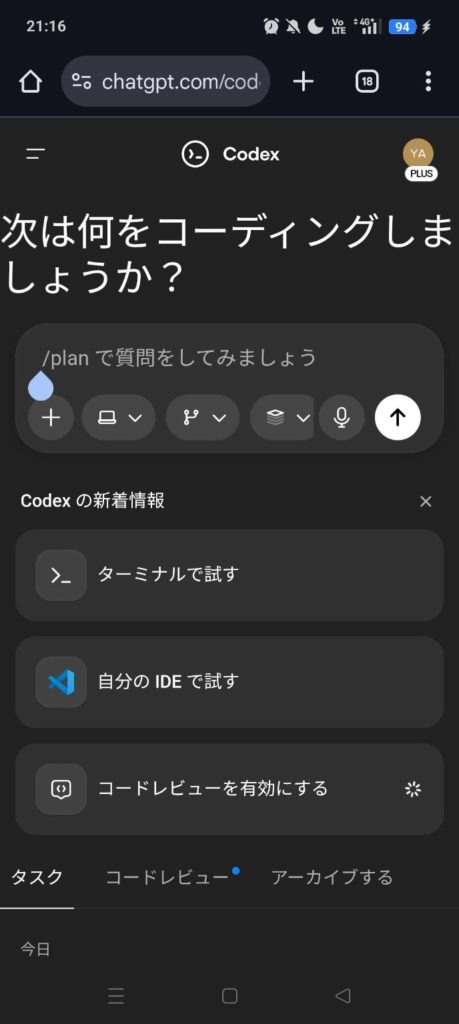
ChatGPT's coding agent feature (Codex) is extremely convenient because it can be used not only from a PC but also from smartphone apps, allowing you to proceed with development while on the move or in environments where you cannot open a PC. However, upon actual use, it turns out there is a significant difference in usability between the Android and iOS versions.
This article summarizes the differences between Android and iOS when using Codex on a smartphone, and the current optimal solution.
1. Where can Codex be used?
Since Codex basically operates as an agent on the cloud, it can be used regardless of the environment.
- Web / Desktop: Full features available in coordination with IDEs and terminals.
- Mobile App: Accessible from the official ChatGPT apps for iOS and Android.
However, there is a difference in the "degree of UI integration" in mobile apps.
2. iOS Version: Native Integration is Advanced
In the ChatGPT app for iPhone / iPad, the Codex feature is relatively deeply integrated.
Features of the iOS Version:
- Progress of Codex tasks can be checked within the app.
- UIs for checking code differences (Diff) and creating pull requests are provided.
- It may support Live Activities on the lock screen, making it easy to understand the status of background processing.
With the iOS version, the flow of "Task Instruction -> Code Check -> PR Creation" can be completed smoothly to some extent even on a smartphone alone.
3. Android Version: Strong Feeling of Web UI Wrapper
On the other hand, the Android version of the ChatGPT app currently gives the impression that native UI dedicated to Codex is lacking.
Stress Points of the Android Version:
- No Dedicated UI: There is no view dedicated to Codex, and it often behaves like displaying the Web version UI as is.
- Operability: Since it is not optimized as a native app, it is difficult to check code and manage tasks.
- Functional Difference: Coordination with OS functions (optimization of widgets and notifications) like iOS is lagging.
It is not "unusable", but if you know the PC version or iOS version, there are many situations where you feel stressed by the subtlety of the UI.
4. Why is there a difference?
OpenAI states that Codex can be run in any environment, but in app implementation, the iOS version tends to be enhanced first. The Android version often follows in feature implementation, and at present, it is highly likely that it remains "UI centered on Web access".
Conclusion: Which one for development on smartphone?
Current Conclusion:
- iOS Users: Use the app version actively. You can benefit from the native UI.
- Android Users: The app version is still developing. It is safer to access the Web version via a browser or limit it to simple instructions.
I would like to expect that the Android version will also have UI integration comparable to iOS in future updates.
