What you will be able to do in this chapter:
- Correct way to break through "Approval Screen"
- What is "6-minute wall"?
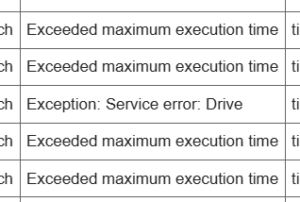
- How to deal with errors (How to read logs)
- Time required: 10 minutes (reading only)
- Stumbling block: Scared by being told "Not safe" on the approval screen (It's okay!)
"I did exactly as I was told, but it doesn't work!" I summarized the points to check in such cases. I will organize execution authority, execution time, investigation procedures when broken, etc.
1. The Biggest Barrier: Security Guard named "Authorization"
When you run GAS for the first time, you are always asked for "Authorization". Many people give up here thinking "Scary!" because English appears on the screen or a red warning mark appears. However, this is normal behavior.
Breakthrough Procedure (Presenting pass to security guard)
- A screen
Authorization requiredappears, so select your account. - A scary screen "This app hasn't been verified" appears.
- This is just asking "It's not a Google official app, is it okay?".
- Don't panic here, click the link "Advanced" at the bottom left.
- A link "Go to (unsafe page)" appears further down, so click this.
- Finally click "Allow".
Why does such a screen appear?
This is a confirmation "The code you wrote is trying to operate your email or drive. Do you really allow it?". It is a function to prevent malicious viruses, but if it is code you wrote yourself, it is safe, so please allow it confidently.
2. "6-minute Wall" and "Truck Delivery Law"
GAS has a strict limit of "One execution is up to 6 minutes". (In the case of a free Gmail account. If it is a paid Google Workspace account, it extends to 30 minutes depending on conditions, but basically "finishing short" is justice.)
As a technique to avoid this, please remember the "Truck Delivery Law".
❌ Slow way (Carry one by one by bicycle)
// Write to spreadsheet 1000 times
for (let i = 0; i < 1000; i++) {
  sheet.getRange(i + 1, 1).setValue("Data"); // Communication occurs every time!
}
With this, communication with Google's server occurs every time you write once, so 6 minutes will pass immediately. It's like repeating "Carry one package from Tokyo to Osaka, come back again…" 1000 times.
⭕ Fast way (Load on truck and carry at once)
// Collect data in array (loading platform)
let data = [];
for (let i = 0; i < 1000; i++) {
  data.push(["Data"]);
}
// Write only once
sheet.getRange(1, 1, 1000, 1).setValues(data); // Communication is only once!
The trick is to use setValues (plural) instead of setValue (singular).
Just by this, the processing speed changes about 100 times.
It is an image of "Load the truck fully and carry it in one go".
3. Troubles specific to Clasp
Q. Error occurred when I did clasp push!
- Cause: Are there functions or variables with the same name in another file?
- Explanation: GAS combines all files as "one huge file" and executes it.
const x = 1;ina.jsconst x = 2;inb.js- If this exists, it gets angry saying "x is duplicated!".
- Countermeasure: Make sure variable names do not overlap, or declare them inside functions.
Q. I deleted the file, but it remains on Google!
- Cause: Even if you delete a file locally, just doing
clasp pushdoes not delete the file on Google. - Countermeasure: This is the specification of Clasp. If you want to delete the file on Google as well, you need to delete it in the browser or tweak
appsscript.jsonwhich is a bit advanced.- While you are a beginner, "Delete in browser" is the most certain.
4. Basics of Debugging: Let's look at the log
When it doesn't work, anyway let's set Logger.log().
Identifying "how far it worked and where it stopped" is a shortcut to solution.
function myFunction() {
  Logger.log("1. Start processing"); // Does this appear?

  var data = getData();
  Logger.log("2. Data acquisition complete: " + data); // Is data taken?

  processData(data);
  Logger.log("3. End processing"); // Did it come this far?
}
If an error message appears, copy it and paste it to Copilot or ChatGPT. If you ask "What does this error mean? How should I fix it?", it will tell you the correct answer with 99% probability.
[Preserved Version] Strongest Template when asking AI
When an error occurs, if you tell AI (or human) like this, the solution will come back in one shot.
[Error Message]
Exception: The parameters (String) don't match the method signature for SpreadsheetApp.getRange.

[What I did]
I wrote sheet.getRange("A") trying to get column A of the spreadsheet.

[Expected behavior]
I want to get all data in column A.
Especially if you are using Copilot on VS Code, it is fastest to select the line where the error is occurring and throw it to "Copilot Chat". Just saying "Fix this", it presents a correction plan. AI Agent is your strongest debugging partner.
Frequently Asked Questions (Q&A)
Q. I'm scared to press "Unsafe page" on the approval screen.
A. If it is code you wrote yourself, it is 100% safe. Google is just issuing a warning uniformly for "code whose contents are unknown". If there is no malice in the code you wrote (or copied and pasted), please allow it with confidence.
Q. What should I do if I want to exceed the 6-minute wall?
A. Make it a paid version or split the processing. If it is Google Workspace (paid version), it extends to 30 minutes. If you do it with the free version, ingenuity (split execution) is necessary, such as the script recording progress itself and proceeding little by little like "Today from line 1 to 1000" "Tomorrow from line 1001".
Understanding Check Test
Q1. What is the hidden link to click first on the “Approval Screen” that appears at the first execution?
Answer: AdvancedQ2. What is the execution time limit for GAS (free version)?
Answer: 6 minutesQ3. What is the “Truck Delivery Law” to speed up processing?
Answer: Instead of writing data one by one, collect it in an array and write it at onceWhat to do in the next chapter:
- Challenge to TypeScript (JavaScript with types)
- Introduction of Git (History Management)
- AI Prompt Engineering
>> Next Chapter: Chapter 9 What to do next
Series Index
- [Pinned] Complete Clasp x GAS Guide for Absolute Beginners (ZIDOOKA!)
- Chapter 0: What are GAS and Clasp anyway?
- Chapter 1: Minimum things to know before using Clasp
- Chapter 2: Setting up the environment for Clasp
- Chapter 3: Connecting Google Account and Clasp
- Chapter 4: Creating your first GAS project
- Chapter 5: Writing GAS code
- Chapter 6: Understanding push / pull
- Chapter 7: Image of using GAS for "Real Work"
- Chapter 8: Points where beginners always get stuck (Current)
- Chapter 9: What to do next