Traffic Spike? No, Just a Config Error
Hello, this is ZIDOOKA. Recently, I noticed something strange while looking at the Google Analytics 4 (GA4) numbers for a news site I manage.
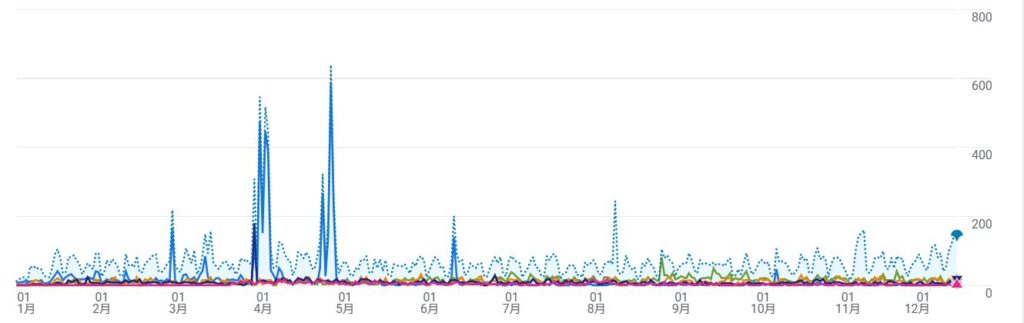
"The page views (PV) are unusually high." "It looks like traffic spiked, but it doesn't match the actual feel."
At first, I thought positively: "Maybe there was an external factor?" or "Did search traffic jump?" But the conclusion was simple— The cause was almost 100% my own configuration error.
In this article, I'll share my failure story of "GA4 double counting," how I discovered it, and how I fixed it. I hope this helps anyone searching for "GA4 page views strange" or "GA4 sudden spike."
What Was Happening?
The problem was simple: GA4 was running through multiple channels simultaneously.
Specifically, the following three were mixed:
- GA4 tracking via the WordPress official plugin (Site Kit)
- GA4 tracking from another source (Theme or GTM)
- Residual code from the old UA (Universal Analytics)
In short, multiple page_view events were being sent for a single page load.
Traffic hadn't increased; I was just inflating the same views myself.
Why Didn't I Notice Sooner?
In GA4, page_view is the most basic and most easily "triggered" event.
- It sends automatically.
- It fires on URL changes and re-renders.
- It often conflicts with AMP and dynamic pages.
This leads to strange phenomena:
- Extremely low (or high) bounce rate: Because multiple events fire, sessions are easily misclassified as "engaged."
- Page views spike alone: The number of users stays the same, but PVs double.
The Clue: Discrepancy with Search Console
What tipped me off was the discrepancy with Google Search Console.
Search Console's "Clicks" show how many people actually came to the site from Google Search. On the other hand, GA4's "Views" and "Sessions" measure behavior on the site.
Usually, these two should correlate to some extent. But on my site, Search Console clicks were flat, while GA4 PVs were skyrocketing. "People aren't coming from search, but pages are being viewed?" This was clearly unnatural.
The Solution: Consolidate Tracking Tags
The solution is simple: "Use only one tracking tag."
I cleaned it up with the following steps:
- Consolidate to Site Kit: If you use WordPress, the official Google Site Kit plugin is the easiest to manage.
- Pause GTM (Google Tag Manager) tags: If you have GA4 configured in GTM, pause or remove it to avoid duplication with Site Kit.
- Check Theme Settings: Check the "Header/Footer Settings" or "Analytics Settings" in your theme for any hard-coded scripts and remove them.
Summary
Before celebrating "Traffic is up!", it's important to be skeptical.
- Does it correlate with Search Console clicks?
- Does it coincide with a configuration change?
- In real-time tracking, is your own visit counted as "1"?
It was an embarrassing failure, but I learned a bit more about how GA4 works. Be careful of mysterious traffic spikes!