When working with Google Apps Script (GAS), especially in scripts that interact heavily with Google Drive, you may suddenly encounter the following error:
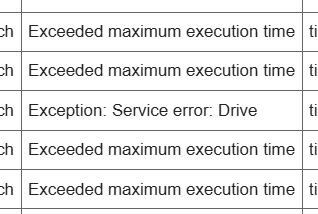
Exception: Service error: Drive
This message is vague, provides little diagnostic information, and often appears inconsistently. In real-world usage, it is also very common for this error to appear alongside “Exceeded maximum execution time”, even when the script logic itself has not changed.
This article focuses on what is actually happening when this error occurs, and how it can be mitigated in production scripts, without drifting into abstract architecture theory.
What “Exception: Service error: Drive” Really Means
This error indicates that a Google Apps Script execution failed internally while calling a Drive-related service, such as:
- DriveApp
- SpreadsheetApp (Drive-backed operations)
- File copy / move / search operations
Crucially, it does not necessarily mean:
- The file ID is invalid
- Permissions are missing
- Google Drive is “down”
In many production cases, the script is already close to one or more execution limits when this error is thrown.
A Common Real-World Pattern
In operational environments, this error often appears under conditions like the following:
- A time-driven trigger runs at night
- The script scans a Drive folder with many files
- Each file is copied, moved, or inspected
- Results are written to a spreadsheet
At first, the script runs successfully. Over time, as the number of files grows, execution becomes unstable.
Eventually, one of these outcomes occurs:
- The run fails with Exceeded maximum execution time
- The run fails with Exception: Service error: Drive
Even though the code and trigger remain unchanged, the error message varies between executions.
Why Different Errors Appear for the Same Script
Internally, Google Apps Script enforces multiple limits simultaneously:
- Overall execution time
- Service-level quotas
- Internal API stability thresholds
When a script approaches these limits:
- If the execution time limit is reached first, a timeout error is returned
- If a Drive-related API call fails first, a Drive service error is returned
From the developer’s perspective, this looks random. In reality, both errors originate from the same underlying issue: too much Drive-related work in a single execution.
Ineffective First Reactions (Common Mistakes)
When this error first appears, it is common to suspect:
- Incorrect file or folder IDs
- Missing Drive permissions
- Temporary Google-side outages
While these causes are possible, they are not the most common reason in production scripts that previously worked.
Re-running the script may succeed temporarily, which further obscures the real cause.
Practical Fix #1: Split Drive Operations into Smaller Batches
The most effective fix is to avoid processing all Drive items in a single execution.
Practical steps include:
- Limit the number of files processed per run
- Store progress using Script Properties
- Allow the script to resume from where it stopped
This keeps execution time well below critical thresholds and significantly reduces Drive API stress.
Practical Fix #2: Reduce Repeated DriveApp Calls
Drive-related calls are expensive in terms of execution time and internal quota usage.
Effective optimizations include:
- Avoid calling
getFileById()repeatedly for the same file - Cache file references within a single execution
- Remove unnecessary Drive metadata lookups inside loops
Reducing call frequency alone can dramatically improve script stability.
Why This Error Commonly Appears with Execution Timeouts
It is very common to see this error appear alongside timeout-related errors.
This is because both errors are symptoms of the same situation:
- The script is approaching execution or service limits
- The failure point depends on which limit is hit first
As a result, different error messages may appear across different runs, even with identical code.
When to Stop Forcing a GAS-Based Solution
If this error persists even after batching and optimization, the workload may exceed what GAS is suitable for.
Examples include:
- Tens of thousands of files
- Heavy OCR or PDF processing
- Large-scale external API orchestration
In such cases, continuing to force a GAS-only solution often leads to ongoing instability.
Summary
“Exception: Service error: Drive” is rarely a Drive-specific failure.
In practice, it is most often a signal that:
- Drive operations are too heavy for a single execution
- The script is operating near execution or internal service limits
When this error appears together with execution timeouts, the correct response is not deeper debugging of Drive itself, but a change in how the work is divided.
By restructuring scripts to process smaller units of Drive-related work per execution, this error can usually be eliminated entirely.