GitHub Copilot is incredibly useful, but sometimes it stops working with “mysterious errors.” Even if it says “Server error,” the cause and solution are completely different depending on whether it is 502, 504, or Stream terminated.
In this article, we have organized the Copilot error articles verified and resolved by ZIDOOKA! by error message. Choose the solution that matches the error currently on your screen.
1. Server Errors
If the chat stops responding, first check the error code (number) or message.
Server error: 502 (Bad Gateway)
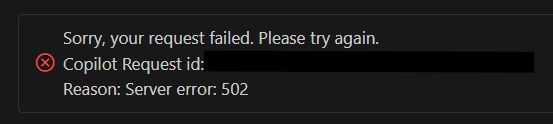
Sorry, your request failed. Please try again.
Reason: Server error: 502
Symptom: Request sent, but no response from AI. Cause: Trouble with Copilot’s relay server. Fix: Restart VS Code, or wait for recovery.
👉 Details: Fix “Server error: 502” in VS Code GitHub Copilot
Server error: 504 (Gateway Timeout)
Reason: Server error: 504Symptom: Processing continues for a long time and finally times out. Cause: Temporary processing congestion. Common in Agent Mode. Fix: Often fixed by just sending the same instruction again.
👉 Details: Copilot “Server error: 504” in VS Code — What Happened
Server error. Stream terminated
Reason: Server error. Stream terminatedSymptom: Answer generation cuts off abruptly. Cause: Instability of the AI model used (especially Gemini 3 Pro Preview). Fix: Switching the model to GPT-4o or Claude 3.5 Sonnet fixes it immediately.
👉 Details: Gemini 3 Pro “Server error. Stream terminated” Causes and Fixes
2. Account, Permission, and Limit Errors
Patterns where you are told “You can’t use it” or “No permission.”
You have exceeded the limit for premium requests
You have exceeded the limit for premium requestsSymptom: High-performance models (like GPT-4o) become unavailable. Cause: Reached limits of Copilot Free plan, etc. Fix: Switch to standard model (GPT-4o mini) or upgrade to Pro plan.
👉 Details: “You have exceeded the limit for premium requests” Fix
Copilot Premium Usage Monitor 404 Error
Symptom: Page not found when trying to check usage. Cause: This dashboard is not provided for individual or student plans.
👉 Details: Why Copilot Premium Usage Monitor Returns 404
CLI: exceeded your copilot token usage
Sorry, you have exceeded your copilot token usageSymptom: Cannot generate commands with GitHub Copilot CLI. Cause: Rate limit specific to the CLI version. Fix: You have to wait (paying often doesn’t lift it immediately).
👉 Details: GitHub Copilot CLI Error: ‘Sorry, you have exceeded your copilot token usage’
net::ERR_SOCKET_NOT_CONNECTED (English)
net::ERR_SOCKET_NOT_CONNECTED
Symptom
GitHub Copilot in VS Code (especially Copilot Chat / Copilot Agent) stops responding and shows an error.
Cause
A broken communication session where Copilot’s internal socket (WebSocket / HTTP2) has already been disconnected, but VS Code still attempts to send a request.
This is a network/session-level issue, not a problem with your code or configuration.
Fix
- Restart VS Code
- Run
GitHub Copilot: Restart Language Server
from the Command Palette
In most cases, this resolves the issue.
👉 Details:
Why net::ERR_SOCKET_NOT_CONNECTED occurs in VS Code with GitHub Copilot
Summary: Check the “Wording” First
Copilot errors may look the same, but they are divided into “Wait and it fixes itself (502/504)” and “Won’t fix unless you change settings (Stream terminated / Permissions)”.
If in doubt, try restarting VS Code and switching models first. If that doesn’t work, refer to the error-specific articles above.
