Copilot Premium Usage Monitor is a Visual Studio Code extension that helps you track how much of your GitHub Copilot Premium quota you are using, directly inside VS Code.
If you use Copilot daily, you may have wondered:
- How much of my Premium quota have I already used?
- Do I still have room this month?
- Am I about to hit a hidden limit?
This extension exists to make that usage visible without leaving your editor.
Why This Extension Is Useful
GitHub Copilot does provide official usage and billing information, but in most cases you need to open a browser and check a web dashboard. In practice, that means developers rarely look at it while coding.
Copilot Premium Usage Monitor solves this by showing usage information inside VS Code itself. As soon as you open the editor, you can see whether your Premium usage is under control.
This extension is especially useful if you:
- Use Copilot almost constantly
- Rely on Copilot Chat or advanced generation features
- Want to avoid unexpectedly exhausting your monthly quota
- Spend long hours coding in VS Code
Instead of guessing, you get immediate feedback.
How to Install Copilot Premium Usage Monitor (VS Code)
Installation is straightforward and uses the official VS Code Marketplace.
Step 1: Open the Extensions View
Launch VS Code and open the Extensions panel.
You can do this via the sidebar icon or with the shortcut:
- Ctrl + Shift + X (Windows / macOS)
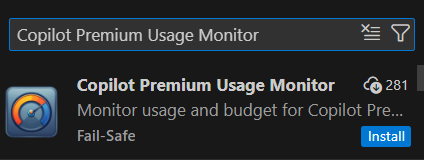
Step 2: Search for the Extension
In the search box, type:
- Copilot Premium Usage Monitor
The extension is published by Fail-Safe.
Step 3: Install
Click Install.
No restart is required after installation.
Initial Setup: Token Configuration
After installation, you will likely see a notification such as:
No secure token present. Add one to track personal spend.
This is expected behavior. The extension needs a GitHub Personal Access Token (PAT) to read usage information.
How to Create and Set a GitHub Personal Access Token
Step 4: Create a Personal Access Token
Go to GitHub and create a Personal Access Token (fine-grained token is recommended).
Read-only access is sufficient.
Relevant permissions include:
- copilot (read Copilot settings)
- manage_billing:copilot (read Copilot billing information)
Note that even with these permissions, data may not be available depending on your account type.


Step 5: Set the Token in VS Code
Back in VS Code, click Set Token when prompted.
Paste your token (for example, starting with ghp_) and press Enter.
Once set, the extension will attempt to sync usage data.
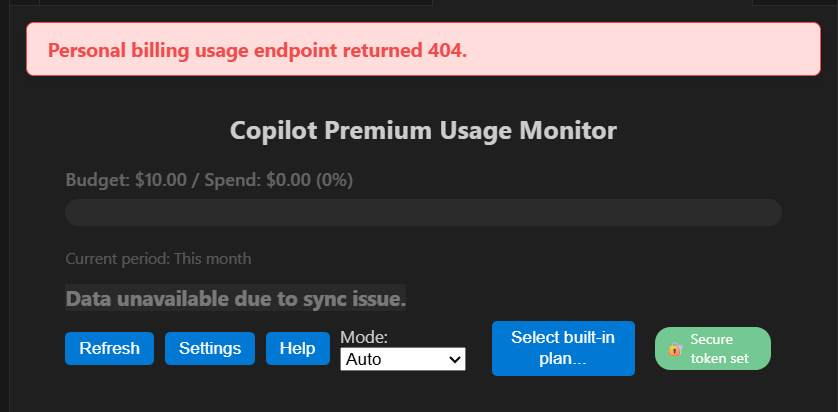
Common Error: “Personal billing usage endpoint returned 404”
After setup, some users encounter the following error:
Personal billing usage endpoint returned 404
This is not necessarily a bug.
Why This Happens
In most cases, this error occurs because of account type limitations, not incorrect setup.
Common scenarios include:
- You are using Copilot via a student or education plan
- Your Copilot access is provided through an organization or enterprise seat
- Your account does not have personal billing data at all
In these cases, GitHub does not expose a personal billing endpoint, so a 404 response is expected behavior.
Who This Extension Is (and Is Not) For
Well suited for:
- Individual users with a personal Copilot Premium subscription
- Developers who manage their own Copilot billing
- Users who want real-time awareness of Premium usage inside VS Code
Limited usefulness for:
- Students using free educational Copilot access
- Developers using Copilot through a company or organization
- Users who do not control billing or quotas themselves
Even when usage data is unavailable, the extension can still serve as a visual reminder and manual tracking aid.
Conclusion
Copilot Premium Usage Monitor is not about adding new Copilot features.
It is about visibility and control.
For developers who rely heavily on GitHub Copilot, understanding usage patterns helps prevent surprises and encourages more intentional use. Even if you encounter a 404 error, that result often reflects GitHub’s billing model rather than a misconfiguration.
If Copilot is part of your daily VS Code workflow, this extension is worth trying.
References
- Copilot Premium Usage Monitor – VS Code Marketplace
https://marketplace.visualstudio.com/items?itemName=fail-safe.copilot-premium-usage-monitor - Monitoring your Copilot usage and entitlements – GitHub Docs
https://docs.github.com/copilot/how-tos/monitoring-your-copilot-usage-and-entitlements