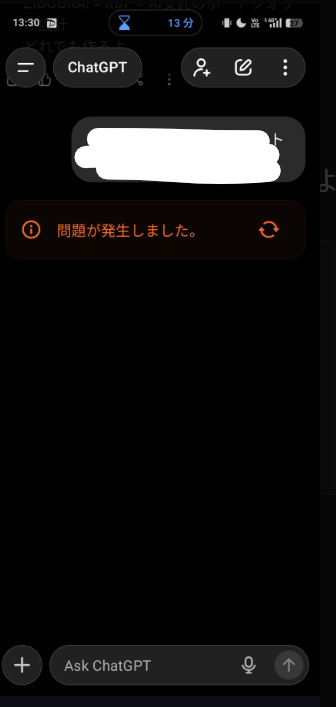
Point: Try Reloading or Switching Models First
Hello, this is ZIDOOKA! As of December 2025, many users are encountering a "Something went wrong. ↻" error while using the ChatGPT app on Android/iOS.
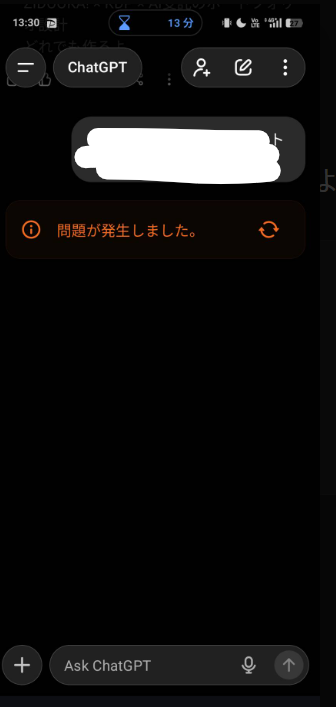
In short, this is usually caused by "momentary network interruptions" or "server congestion". It is rarely a critical bug, so please stay calm and try the following solutions.
Reason: Why Does This Error Occur?
This error appears when the app fails to receive a response from the server. It frequently happens in the following situations:
- Network Glitches: When moving (e.g., on a train) or switching between Wi-Fi and mobile data.
- After Switching Models: When switching from
GPT-4otoo1, for example, causing a session state mismatch. - Server Congestion: During peak hours when global traffic is high.
Especially recently (Dec 2025), with new model updates, the app behavior seems slightly unstable.
Example: 5 Steps to Fix It
If you see this error, try these steps in order:
1. Tap the Reload Icon (↻)
Tap the circular arrow next to the error message. If it's a simple timeout, this will regenerate the response.
2. Switch Models
Try changing the model at the top of the screen (e.g., GPT-4o -> GPT-4o mini) and then switch back. This resets the session and often fixes the issue.
3. Switch Network
If you are on Wi-Fi, switch to Mobile Data (4G/5G), or vice versa.
4. Restart the App
Force close (kill) the app and open it again. This clears temporary glitches or memory issues.
5. Use the Web Version
If the app refuses to work, access chatgpt.com via Chrome or Safari. If the issue is specific to the app, the web version should work fine.
Conclusion
The "Something went wrong" message is a generic error in the ChatGPT app. It does not mean your phone is broken or your account is banned.
Environment:
- Date: December 11, 2025
- Device: Android ChatGPT Official App
- Trigger: Frequent during model switching or unstable network conditions.
If it happens frequently, check the App Store or Google Play Store for updates.
