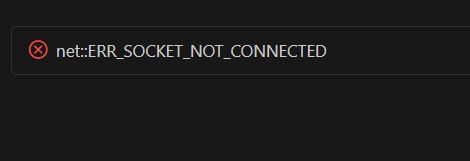
When using GitHub Copilot (especially Copilot Agent / Chat) in VS Code, you may suddenly encounter the following error:
net::ERR_SOCKET_NOT_CONNECTED
At first glance, this might look like a bug in your code or an extension, but this error is almost certainly a network layer issue. Based on actual usage experience, this article summarizes the causes and realistic solutions.
Conclusion: This is not a code error
net::ERR_SOCKET_NOT_CONNECTED occurs when VS Code sends a request while the communication socket (WebSocket / HTTP2) used by GitHub Copilot is already disconnected.
Therefore, it is unrelated to:
- The code you are writing
- Language settings
- The content of your Copilot prompts
When does it happen?
The conditions under which this frequently occurs almost always fall into one of the following categories:
Leaving VS Code open for a long time Copilot Agent maintains a constant connection internally. After waking from sleep mode or leaving it idle for hours, the connection may drop, causing session inconsistency.
Network interruptions Reconnecting Wi-Fi, toggling VPN ON/OFF, or restrictions on school/corporate networks can forcibly disconnect the WebSocket.
High load on Copilot Agent During temporary high load on the Copilot side (GitHub / OpenAI), the session may partially die.
Common Misconceptions
- ❌ You triggered a bug in Copilot
- ❌ VS Code settings are incorrect
- ❌ Extension conflicts
These are incorrect. It is almost 100% just "the connection is dead."
Immediate Fixes (In Order of Recommendation)
Fix 1: Restart Copilot Language Server
This is often enough to solve the issue.
Open the VS Code Command Palette (Ctrl+Shift+P / Cmd+Shift+P) and run:
GitHub Copilot: Restart Language Server
Fix 2: Restart VS Code
If you are using Copilot Agent, this is the most reliable method. The session will be completely re-established.
Fix 3: Switch Networks
- Turn VPN OFF → ON
- Disconnect Wi-Fi → Reconnect
This may regenerate the socket.
Fundamental Workarounds
There is no perfect solution, but keeping the following in mind will reduce the frequency of occurrence:
- Do not leave Copilot Agent running indefinitely.
- Restart VS Code after waking the computer from sleep.
- Assume it will happen frequently on school/corporate networks.
Copilot Agent is convenient, but it is not suited for long-term residency without restarts.
Summary
net::ERR_SOCKET_NOT_CONNECTED is an error with the following characteristics:
- It appears very frequently when using Copilot Agent.
- It is unrelated to your code.
- It is caused by a communication session disconnection.
This is a type of trouble that is "environment-dependent, reproducible, but not worth investigating deeply." If you see this error, don't waste time debugging it; just accept that "the connection dropped" and restart. That is the shortest route to recovery.
Related Articles
