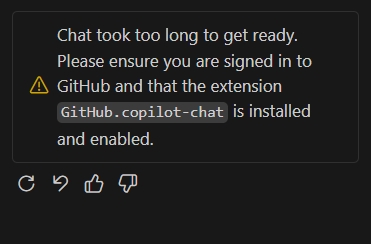
When opening GitHub Copilot Chat immediately after launching VS Code, the error message “Chat took too long to get ready” appeared.
For a moment, I suspected authentication or extension issues, but after waiting without doing anything, Copilot Chat became available as usual within 30 seconds to 1 minute.
【Conclusion】Right after VS Code startup, Copilot Chat initialization is incomplete, so waiting briefly resolves the issue naturally.
What Happened
- Opened Copilot Chat immediately after VS Code startup
- Error message “Chat took too long to get ready” was displayed
- Initially suspected authentication or extension problems
How It Resolved
In the end, it was simply this situation:
- Right after VS Code startup
- Copilot Chat initialization not yet completed
- Accessed while in that state, causing temporary error display
After waiting 30 seconds to 1 minute, Copilot Chat became usable without any action.
What to Do
【Solution】If right after startup, don’t rush to change settings or reinstall—just wait a bit and try opening again.
If you see this error:
- Just wait for a bit (30 seconds to 1 minute)
- Try opening Copilot Chat again
- If still not resolved, restart VS Code
In this case, simply waiting resolved the issue.
Summary
Even if VS Code’s Copilot Chat displays “Chat took too long to get ready,” it’s likely just waiting for initialization if it’s right after startup.
【Note】Before rushing to change settings or reinstall extensions, first try waiting a bit.
If it still doesn’t resolve, then check authentication status or extension version.
That’s all for this case.