When working with API integration or data processing in Google Apps Script (GAS) or JavaScript, you may encounter the error Error: Invalid JSON string.
This error occurs when "the value you tried to process as JSON is not in JSON format". Although it seems like a simple error, in practice, the cause often lies on the response side, making it difficult to notice.
In this article, we will organize why it happens, where to look, and how to fix it, assuming practical GAS usage.
What does this error mean?
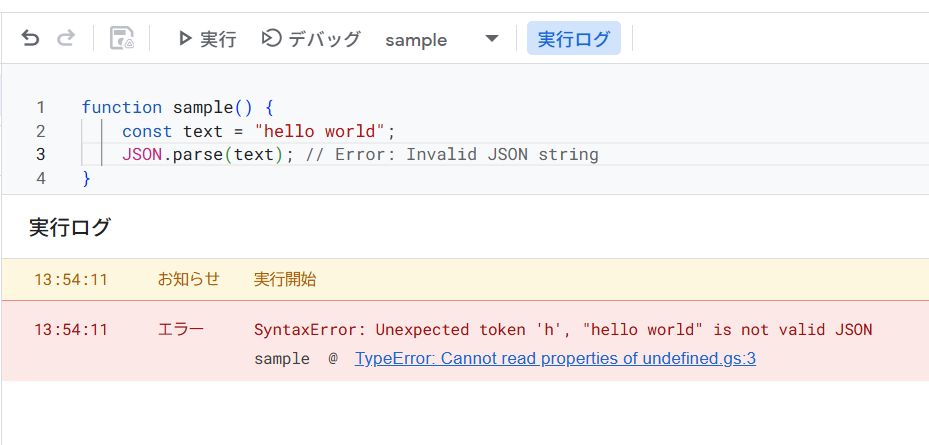
Invalid JSON string often occurs when executing JSON.parse().
JSON.parse(someString);If someString is not a valid JSON format, an exception is thrown.
The important point is that this error means:
- Not that "The JSON is broken"
- But that "What you think is JSON is not JSON in the first place"
In practice, it is almost always the case that you are parsing an unexpected string rather than "invalid JSON".
Common Cause 1: Parsing a string that is not JSON
This is the most common cause.
const text = "hello world";
JSON.parse(text); // Error: Invalid JSON string
Data treated as JSON is often an object or an array.
{"key":"value"}["a", "b", "c"]Although numbers and strings are valid JSON values according to the JSON specification, JSON handled as API responses is almost without exception an object or an array.
If anything else is returned, it is almost always safe to consider it "unexpected".
Common Cause 2: API response is different from expected (Especially common in GAS)
In GAS, API integration using UrlFetchApp.fetch() is very common, and this is the biggest source of Invalid JSON string.
const res = UrlFetchApp.fetch(url);
const data = JSON.parse(res.getContentText());
At this time, what is actually returned might be:
- HTML (Error page)
- Empty string
- Authentication error message
- "JSON-like" text (actually not JSON)
Such cases are not rare.
Particularly common causes are:
- 401 / 403 Errors
- API key not set or expired
- Request limit exceeded
👉 The iron rule is to first output getContentText() to the log as is.
Essential in GAS Practice: How to check the response
To check the content in case of an HTTP error, the following way of writing is very effective in GAS.
const res = UrlFetchApp.fetch(url, {
  muteHttpExceptions: true
});

Logger.log(res.getResponseCode());
Logger.log(res.getContentText());
By using muteHttpExceptions, you can check the response body even when an error occurs.
It is an important point to realize that it is not that "JSON.parse failed", but that JSON was not returned in the first place.
Common Cause 3: Non-JSON formats are mixed in
Cases like the following also occur frequently.
- Error messages or HTML are mixed in
- Newlines or control characters are included
- Mistaking CSV / TSV for JSON
- Extra comma at the end
{"name":"test",}Even if it looks easy to understand for humans, it is invalid as JSON.
In practice, most cases are not that "JSON is broken", but that formats other than JSON are mixed in.
Common Cause 4: Double JSON.parse
It is plain, but a very common pattern in practice.
const obj = JSON.parse(jsonString);
JSON.parse(obj); // Invalid JSON string
A value once parsed with JSON.parse is already an object.
There is no need to parse it again.
It is common to accidentally re-parse during log output or debugging.
Checks you must do when debugging
If an error occurs, check in the following order:
- Check the type
- Output the content as is
- Consider if
JSON.parseis really necessary
Logger.log(typeof value);
Logger.log(value);
Just doing this often reveals the cause immediately.
Safe coding (Defensive implementation)
In practice, coding that assumes exceptions is recommended.
function safeParseJson(text) {
  try {
    return JSON.parse(text);
  } catch (e) {
    Logger.log("Invalid JSON: " + text);
    return null;
  }
}
When using this function, be sure to consider the possibility that the return value will be null.
If you reference a property as is, it will cause another error.
Summary
Invalid JSON stringis a sign that you are parsing something that is not in JSON format.- Most causes are unexpected API responses.
- First, "Check the content as is".
- Use
muteHttpExceptionsto see the response. - Beware of double parse.
- Defense with try-catch is essential in practice.
JSON is a "data format". The biggest countermeasure is not to process with assumptions, but to see what is actually being returned.