When processing using Google Apps Script (GAS) or various APIs,
you may encounter the error Authorization is required to perform that action.
In short, this error means: "You do not have permission to perform that operation."
However, in practice, it is an error that is easy to get stuck on because it is difficult to understand:
- What permissions are missing?
- Where has the authentication expired?
- Is my code bad, or is the setting bad?
In this article, we will organize why it happens, common causes in practice, check points, and solutions.
What does this error mean?
Authorization is required to perform that action is returned when you try to operate without the necessary authentication/permissions for:
- API
- Google Services (Drive / Sheets / Gmail, etc.)
- WordPress REST API
- External SaaS
The important point is that this error means:
- Not that the processing content is wrong
- But that the executor's authority is insufficient
Common Cause 1: GAS authorization is unexecuted or incomplete
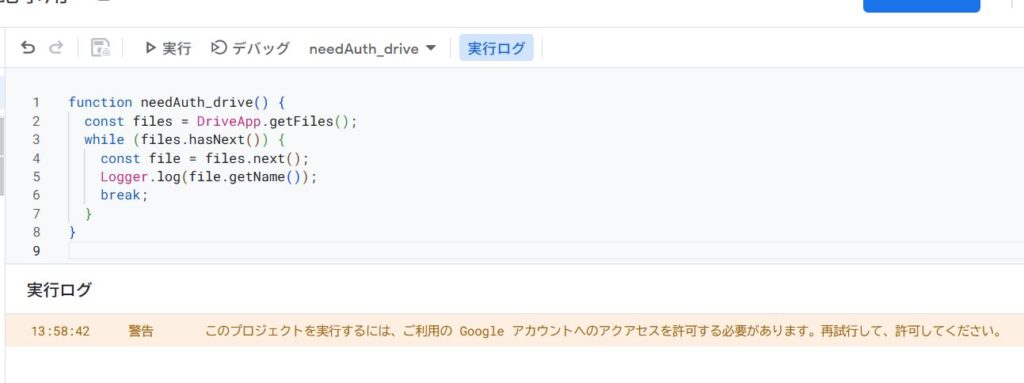
In GAS, Authorization is required at the first execution or when changing scopes.
It occurs frequently in cases like the following:
- Started using a new Google service
- Used Drive / Gmail / Calendar additionally
- Edited the manifest (
appsscript.json) - Executed from a trigger
👉 Basically, execute it manually once on the editor and pass the authorization screen.
Common Cause 2: Insufficient privileges during trigger execution
In time-driven triggers and form triggers, the authority of the execution user may become a problem.
- Running with permissions other than the creator
- Running like a service account
- Touching Drive / Spreadsheet that cannot be accessed
In this case, even if an error occurs, the code itself is almost always correct.
Common Cause 3: Insufficient OAuth scopes
In GAS, OAuth scopes are required for each service used.
For example:
- Operate Drive → Drive scope
- Send Gmail → Gmail scope
- Hit external API → External communication scope
If you are manually editing appsscript.json,
this error may occur due to lack of scope.
👉 Even if you leave it to automatic scope, it is often resolved by passing re-authorization once.
Common Cause 4: External API authentication header missing or expired
When hitting an external API with UrlFetchApp.fetch(),
the following are very often the cause:
- Authorization header is not set
- Bearer token expired
- API key is wrong
- There is an API key, but the authority is insufficient
const res = UrlFetchApp.fetch(url, {
  headers: {
    Authorization: "Bearer YOUR_TOKEN"
  }
});
A case where this error message is returned together with 401 / 403 is a typical example.
Common Cause 5: No authority for the operation target itself
Lack of authority on the target resource side, not the GAS side, is also common.
- Unshared Drive files
- Spreadsheet without edit permission
- Administrator-only API operations
- Endpoints requiring administrator privileges in WordPress
In this case, it is in a state of "Authentication passed, but operation is refused".
Points to check without fail during debugging
If an error occurs, check the following in order:
- Did you execute manually on the editor and pass authorization?
- Who is the execution user? (Including triggers)
- Do you have authority for the operation target?
- Is the Authorization header of the external API correct?
- Are the token and API key valid?
In the case of an external API, be sure to output the following log.
const res = UrlFetchApp.fetch(url, {
  muteHttpExceptions: true
});

Logger.log(res.getResponseCode());
Logger.log(res.getContentText());
With this, 401 / 403 / message content can be seen clearly.
Thinking in practice (Important)
When this error occurs,
- Before doubting the logic
- Before doubting
JSON.parse
Organizing "Who is trying to do what with whose authority" is the shortest route.
Even if the code is correct, it will definitely fail without authority.
Summary
Authorization is required to perform that actionis an insufficient privilege error- GAS authorization unexecuted / trigger execution is likely to be the cause
- Also occurs with insufficient OAuth scope
- Be sure to check the Authorization header in external APIs
- Check the authority of the target resource side as well
This error is not "difficult", but it is a type of error that you will get stuck in forever if you miss the check points.
Authority / Executor / Target Resource. By isolating these three points, you can almost certainly resolve it.