When using Cloud Vision API's OCR in a practical setting, you often run into the issue where "the official documentation samples are too fragmented, and it's unclear how to connect them all together."
Specifically, tasks like:
- Uploading to GCS
- Running asynchronous OCR
- Retrieving and merging the result JSONs
It is very convenient to have a script that can execute these steps as a continuous workflow.
In this post, I am sharing the "Minimal configuration script to safely run Cloud Vision OCR via CLI" that I actually use in my projects.
It is designed with security in mind, ensuring that credentials are not hardcoded. Feel free to copy, paste, and adapt it to your own environment.
Minimal Script (Python)
This script includes the following features:
- Creates a GCS bucket (if it doesn't exist)
- Uploads the PDF
- Executes asynchronous OCR
- Downloads the result JSONs and merges the text
import os
from google.cloud import vision
from google.cloud import storage
import json

# ==============================
# Configuration (ANONYMIZED)
# ==============================

# NOTE:
# - Do NOT hardcode real credential file names in public code
# - Use environment variables or placeholders

# Example (set outside this script):
# export GOOGLE_APPLICATION_CREDENTIALS="/path/to/your/service-account.json"

# os.environ["GOOGLE_APPLICATION_CREDENTIALS"] = "your-service-account.json"  # ❌ avoid in public code


def create_bucket_if_missing(bucket_name: str):
    """Create a GCS bucket if it does not exist."""
    storage_client = storage.Client()
    bucket = storage_client.bucket(bucket_name)

    if not bucket.exists():
        print(f"Bucket '{bucket_name}' not found. Creating...")
        storage_client.create_bucket(bucket)
        print(f"Bucket '{bucket_name}' created.")
    else:
        print(f"Bucket '{bucket_name}' already exists.")


def upload_blob(bucket_name: str, source_file: str, destination_blob: str):
    """Upload a local file to GCS."""
    storage_client = storage.Client()
    bucket = storage_client.bucket(bucket_name)
    blob = bucket.blob(destination_blob)

    blob.upload_from_filename(source_file)
    print(f"Uploaded '{source_file}' to 'gs://{bucket_name}/{destination_blob}'.")


def async_detect_document(gcs_source_uri: str, gcs_destination_uri: str):
    """Run async OCR (PDF/TIFF) using Cloud Vision API."""

    client = vision.ImageAnnotatorClient()

    feature = vision.Feature(
        type_=vision.Feature.Type.DOCUMENT_TEXT_DETECTION
    )

    input_config = vision.InputConfig(
        gcs_source=vision.GcsSource(uri=gcs_source_uri),
        mime_type="application/pdf",
    )

    output_config = vision.OutputConfig(
        gcs_destination=vision.GcsDestination(uri=gcs_destination_uri),
        batch_size=1,
    )

    request = vision.AsyncAnnotateFileRequest(
        features=[feature],
        input_config=input_config,
        output_config=output_config,
    )

    print(f"Running OCR for: {gcs_source_uri}")
    operation = client.async_batch_annotate_files(requests=[request])
    operation.result(timeout=300)
    print("OCR completed.")


def list_blobs(bucket_name: str, prefix: str):
    """List blobs in a bucket with a given prefix."""
    storage_client = storage.Client()
    return storage_client.list_blobs(bucket_name, prefix=prefix)


def fetch_ocr_results(gcs_destination_uri: str):
    """Download OCR result JSON files and merge extracted text."""

    if not gcs_destination_uri.startswith("gs://"):
        raise ValueError("Destination URI must start with gs://")

    path = gcs_destination_uri.replace("gs://", "")
    bucket_name, prefix = path.split("/", 1)

    output_dir = "ocr_output"
    os.makedirs(output_dir, exist_ok=True)

    full_text = ""

    for blob in list_blobs(bucket_name, prefix):
        if not blob.name.endswith(".json"):
            continue

        local_path = os.path.join(output_dir, os.path.basename(blob.name))
        blob.download_to_filename(local_path)

        with open(local_path, "r", encoding="utf-8") as f:
            data = json.load(f)

        for idx, page in enumerate(data.get("responses", []), start=1):
            annotation = page.get("fullTextAnnotation")
            if not annotation:
                continue

            text = annotation.get("text", "")
            full_text += f"\n\n--- Page {idx} ---\n{text}"

    with open("final_text_output.txt", "w", encoding="utf-8") as f:
        f.write(full_text)

    print("Merged OCR text saved to final_text_output.txt")


if __name__ == "__main__":
    # ==============================
    # Example placeholders ONLY
    # ==============================

    BUCKET_NAME = "your-ocr-bucket-name"
    INPUT_PDF = "input.pdf"
    OUTPUT_PREFIX = "ocr_results/"

    gcs_source = f"gs://{BUCKET_NAME}/{INPUT_PDF}"
    gcs_output = f"gs://{BUCKET_NAME}/{OUTPUT_PREFIX}"

    # create_bucket_if_missing(BUCKET_NAME)
    # upload_blob(BUCKET_NAME, INPUT_PDF, INPUT_PDF)
    # async_detect_document(gcs_source, gcs_output)
    fetch_ocr_results(gcs_output)
Key Points of This Code
1. No Hardcoded Credentials
The script assumes that GOOGLE_APPLICATION_CREDENTIALS is passed as an environment variable. By not writing the path or content of key.json directly in the code, we prevent accidents where credentials might be inadvertently published to GitHub or other public repositories.
2. Merging OCR Results
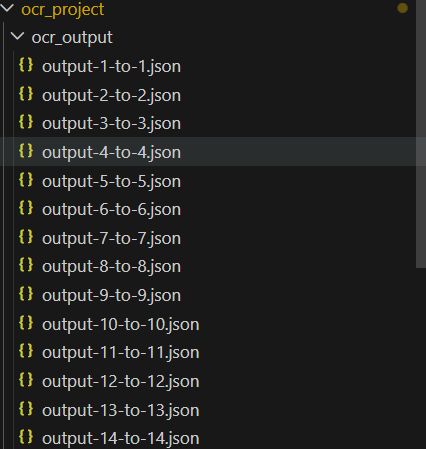
The Cloud Vision API outputs JSON files split by page. The fetch_ocr_results function automatically downloads these files, merges them in page order, and saves the result to final_text_output.txt. In practice, since the goal is almost always "I just want the final text," automating this step makes the process much smoother.
3. Ease of Re-execution
Inside the if __name__ == "__main__": block, the code is structured so you can uncomment and execute only the necessary processing steps. Since OCR can take time, this is convenient for situations like "The OCR is already finished, I just want to fetch the results."
Usage
- Install the necessary libraries
pip install google-cloud-vision google-cloud-storage - Set your credentials to an environment variable
export GOOGLE_APPLICATION_CREDENTIALS="/path/to/your-service-account.json" - Update BUCKET_NAME and other variables in the script, then run it.
Note The output ocr_output/ folder and final_text_output.txt will contain OCR results (which may include confidential information). It is recommended to add these to your .gitignore to ensure they are not included in version control.
Cloud Vision OCR Series Articles
This article is part of a series on setting up and operating OCR using Cloud Vision API.
- [Summary] Cloud Vision OCR x CLI x GCP Setup & Troubleshooting Log](/archives/ocr-series-summary-en)
- Setup: Why Cloud Vision API OCR Failed with IAM and How I Finally Got It Working
- Operation: Why Running Cloud Vision OCR via CLI Was the Easiest Method
- Workflow: Why GCP x VSC x CLI is the Correct Route for Frequent OCR
- Tools: Explanation of Practical Tools Created to Run Cloud Vision OCR via CLI
- Code: Free Code: Minimal Script to Safely Run Cloud Vision OCR via CLI
- Extra: When Stuck in GCP GUI, Escaping to Cloud Shell + CUI Was Faster (Failure Story)