Intro
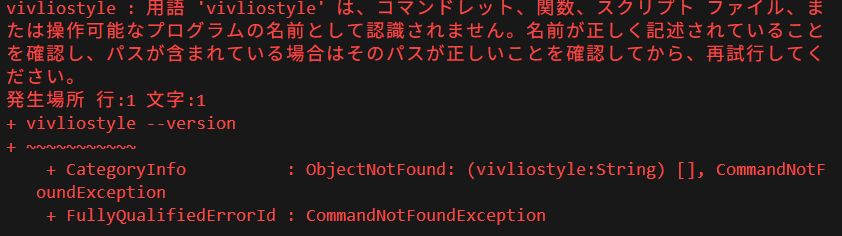
If you encountered the error:
vivliostyle : The term 'vivliostyle' is not recognized as the name of a cmdlet,
function, script file, or operable program.
when running vivliostyle –version, it means that Vivliostyle CLI is not installed or not in your system’s PATH. This article explains why this happens and how to fix it.
What is Vivliostyle CLI?
Vivliostyle CLI is a Node.js-based command-line tool for CSS-powered typesetting workflows, including PDF generation and previews. It must be installed with npm.
Why is the command not found?
Here are the typical reasons:
- Node.js is not installed You need Node.js to run npm and install packages.
- Vivliostyle CLI is not installed globally Running npm install -g @vivliostyle/cli registers vivliostyle as a CLI command.
- npm global binaries folder isn’t in PATH On Windows, the npm global bin folder must be in your PATH.
Steps to fix (Windows / PowerShell)
Step 1: Install Node.js Install Node.js from nodejs.org.
Step 2: Install Vivliostyle CLI Run the following command in PowerShell:
npm install -g @vivliostyle/cliStep 3: Ensure PATH includes npm global bin Verify version:
vivliostyle --versionUsing npx as alternative You can test without installing with:
npx @vivliostyle/cli --versionConclusion
The error simply means the CLI is not recognized by your system. Setting up Node.js and installing Vivliostyle globally will fix it.

