"Switching from Rhino to V8" — what exactly does it mean to have "switched"?
The conclusion is simple:
Enable the V8 runtime in GAS 'Project Settings'.
That's it. But you might wonder, "What changes?" or "How do I confirm it really switched?"
This article explains the specific steps and verification methods.
Note: For detailed background on what "Rhino Deprecation" means and why it is ending, please see the following article: 👉 [Explained] What is GAS 'Rhino Deprecation' and why you must migrate to V8 by 2026
① What exactly are we switching?
Your GAS code doesn't run on its own; it works like this behind the scenes:
Your Code
   ↓
JavaScript Engine (Rhino or V8)
   ↓
Executed on Google Servers
In short:
- Rhino → Old execution engine
- V8 → New execution engine
There is a setting to specify "which engine interprets and executes the code". 👉 You just need to switch that.
② Actual Operation: Where and How?
The steps are very simple.
- Open the Google Apps Script editor.
- Click ⚙ "Project Settings" on the left.
- Look at "Runtime" (or Execution Environment) at the bottom.
- Check (Enable) "Enable Chrome V8 runtime".
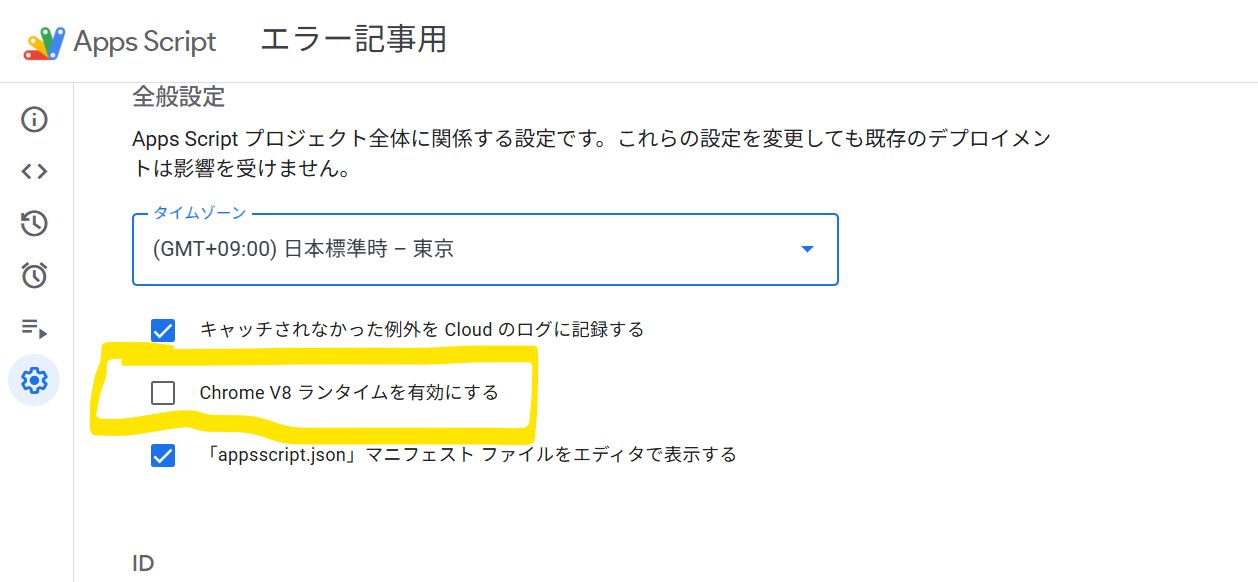
That's it. If it's already checked, you have already switched.
③ When is the switch considered "Complete"?
This is important.
✅ "Switched" means this state:
- V8 is ON in Project Settings.
- You have saved the script in that state.
- You have executed it at least once in that state.
If these three points are met, That project is no longer running on Rhino.
④ Do I need to change my code?
Basically, you don't need to change it.
This is where beginners get anxious, but for:
- Spreadsheet operations
- Form submission triggers
- Email sending
- Drive operations
90% of business GAS like this 👉 Will run as is just by switching to V8.
Google assumes this as well.
⑤ How to Verify "If it Switched" (Important)
Method 1: Check Settings (Most Reliable)
- Project Settings
- Runtime
- V8 Runtime → ON
This is everything.
Method 2: Try syntax only available in V8 (For confirmation)
For example, write this one line somewhere and run it.
const test = 1;- ✅ No error → Running on V8
- ❌ Error in Rhino (Rhino may not support const in some contexts)
Note: This is for confirmation, so you can delete it afterwards.
⑥ Does something happen the moment I switch?
Almost nothing happens. This is actually the scary part.
- The screen doesn't change.
- No "Switched!" notification appears.
- Only the execution environment changes quietly.
So, "Thinking you switched but didn't check" is the most dangerous scenario.
At ZIDOOKA!, we recommend: 👉 Always run manually once after switching. Make this a golden rule.
⑦ What happens to Triggers (Auto-execution)?
This is also important.
- Triggers themselves automatically become V8.
- However, if you haven't executed it once after switching
- → You might only notice when an error occurs.
So:
- V8 ON
- Manual Execution
- Check Logs
Consider the switch "complete" only after this.
⑧ "What happens if I don't switch?"
Let's be clear about this too.
- It works now.
- It will likely work until Jan 31, 2026.
- One day, all automation will suddenly stop.
- There might be cases with no notification.
👉 It will be fatal for business operations.
That's why Google likely started showing the warning "from today". If you saw it for the first time today, it's natural to assume the warning rollout has reached you.
We recommend switching early.
⑨ Did you get an error after switching?
When you switch to V8, errors may occur due to old writing styles (Rhino-era code). Be especially careful if you are using "copy-pasted code".
We have summarized 5 common "breaking patterns".
👉 Why Copy-Pasting Rhino-Era Code is Dangerous: 5 "Old GAS Styles" That Break in V8
【Summary Article】 Here is the complete guide summarizing all information about "Rhino Deprecation / V8 Migration" including this article. 👉 Complete Guide to GAS Rhino Deprecation & V8 Migration