TypeError: Cannot read properties of undefined in Google Apps Script – Practical Solutions
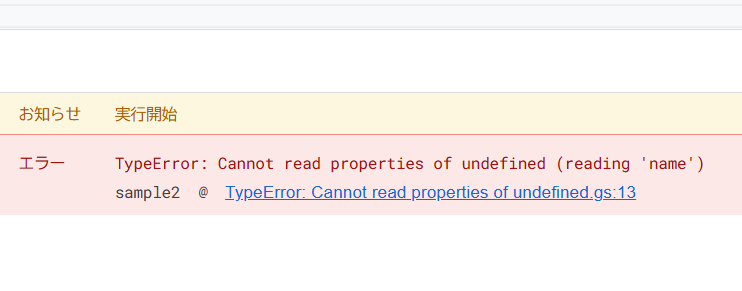
This article explains one of the most common runtime errors in Google Apps Script (GAS): TypeError: Cannot read properties of undefined. By looking at concrete code examples that actually trigger the error, you will understand why it happens and how to prevent it in real-world GAS development.
What does "TypeError: Cannot read properties of undefined" mean?
This error occurs when your code tries to access a property (such as .name or [0]) on a value that is undefined. It is not a GAS-specific bug; it is a standard JavaScript runtime error. However, GAS developers encounter it frequently due to spreadsheets, API responses, and dynamic data structures.
GAS code examples that cause this error
Accessing a non-existent array element
function sampleArray() {
  const arr = [];
  Logger.log(arr[0].name);
}
Because the array is empty, arr[0] is undefined. Attempting to read .name results in a TypeError.
Accessing a missing object key
function sampleObject() {
  const obj = { user: { id: 1 } };
  Logger.log(obj.profile.name);
}
The profile property does not exist, so obj.profile is undefined, and accessing .name throws an error.
Spreadsheet row or column mismatch
function sampleSheet() {
  const sheet = SpreadsheetApp.getActiveSheet();
  const values = sheet.getRange(1, 1, 1, 1).getValues();
  Logger.log(values[1][0]);
}
getValues() returns a two-dimensional array like [[A1]]. Since values[1] does not exist, accessing [0] causes the error.
find() returning undefined
function sampleFind() {
  const users = [
    { id: 1, name: 'Alice' },
    { id: 2, name: 'Bob' }
  ];

  const user = users.find(u => u.id === 3);
  Logger.log(user.name);
}
When find() does not find a match, it returns undefined. Accessing user.name then throws a TypeError.
Why this error is so common in GAS
This error appears frequently in GAS projects for several reasons:
- Spreadsheet data size changes dynamically
- API responses may differ from expectations
find()andfilter()do not guarantee results- Missing checks for empty arrays or objects
The root cause is usually an assumption that data "must exist".
How to prevent this error
Explicit checks with conditionals
if (user && user.name) {
  Logger.log(user.name);
}
Optional chaining (V8 runtime required)
Logger.log(user?.name);Optional chaining safely returns undefined instead of throwing an error when the value does not exist.
Conclusion
"TypeError: Cannot read properties of undefined" is not a mysterious GAS bug. It is a signal that your code is assuming the presence of data without verifying it. By understanding the patterns that cause this error and writing defensive checks, you can significantly reduce runtime failures in production GAS scripts.