TypeError: Cannot read property 'xxx' of null in Google Apps Script – Prevention Guide
This article explains another common runtime error in Google Apps Script (GAS): TypeError: Cannot read property 'xxx' of null. Although it looks similar to the undefined error, its cause and debugging approach are slightly different. Understanding this distinction is essential for stable GAS development.
What does "TypeError: Cannot read property 'xxx' of null" mean?
This error occurs when your code tries to access a property on a value that is explicitly null. In JavaScript, null means "no value on purpose," whereas undefined usually means "not assigned or not found." GAS often returns null in APIs and services when a resource exists conceptually but has no value.
GAS code examples that cause this error
Spreadsheet cell that is empty or invalid
function sampleNullSheet() {
  const sheet = SpreadsheetApp.getActiveSheet();
  const cell = sheet.getRange("A1").getValue();
  Logger.log(cell.value);
}
If the cell is empty, getValue() returns null. Attempting to access cell.value causes the error.
getActiveUser() in unsupported environments
function sampleNullUser() {
  const user = Session.getActiveUser();
  Logger.log(user.getEmail());
}
In consumer accounts or certain execution contexts, getActiveUser() may return null, leading to this error.
Missing parent element in HtmlService
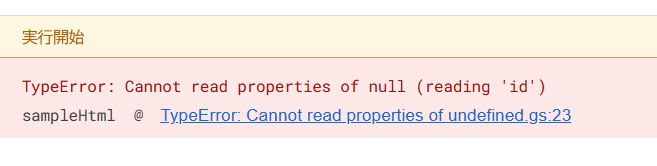
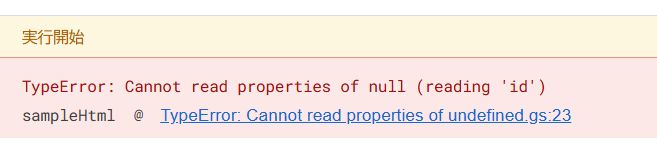
function sampleHtml() {
  const element = null;
  Logger.log(element.id);
}
This often happens when an expected DOM element does not exist or fails to load.
DriveApp file not found
function sampleDrive() {
  const files = DriveApp.getFilesByName("nonexistent.txt");
  const file = files.hasNext() ? files.next() : null;
  Logger.log(file.getId());
}
If no file matches, file becomes null, and accessing its properties causes the error.
Why GAS frequently returns null
GAS services intentionally return null in many cases:
- Empty spreadsheet cells
- Missing Drive files or folders
- Unavailable user context
- Optional configuration values
This design forces developers to explicitly handle "no value" scenarios.
How to prevent this error
Explicit null checks
if (file !== null) {
  Logger.log(file.getId());
}
Defensive defaults
const safeName = file ? file.getName() : "";Optional chaining (when applicable)
Logger.log(file?.getId());Note that optional chaining does not convert null into a valid object; it only prevents the runtime error.
Key difference between null and undefined
| Value | Meaning | Typical GAS source |
|---|---|---|
undefined |
Not assigned / not found | Arrays, objects, find() |
null |
Intentionally empty | Spreadsheet, Drive, Session APIs |
Understanding this difference helps you choose the correct guard strategy.
Conclusion
"TypeError: Cannot read property 'xxx' of null" indicates that your script received an explicit "no value" from a GAS service and attempted to treat it as a valid object. By recognizing where null comes from and adding proper checks, you can prevent many production-time failures in Google Apps Script.