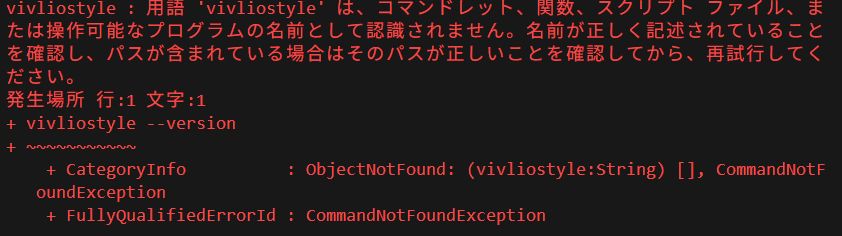
Vivliostyle CLI を使おうとして vivliostyle –version を実行したところ、以下のようなエラーに遭遇したことはありませんか?
vivliostyle : 用語 'vivliostyle' は、コマンドレット、関数、スクリプト ファイル、
または操作可能なプログラムの名前として認識されません。
これは CLI が正しくインストールされていないか、システム PATH に登録されていないことが原因です。本記事では、なぜこのエラーが出るのか、そして確実に Vivliostyle CLI を使えるようにする方法を丁寧に解説します。
Vivliostyle CLI とは
Vivliostyle CLI は、HTML と CSS を用いた組版をコマンドラインで行うためのツールです。公式サイトでも CLI の導入を推奨しており、PDF 生成やプレビュー表示が行えます。
なぜ Vivliostyle が認識されないのか?
PowerShell で vivliostyle が見つからない理由は主に次の 3 つです。
1. Node.js がインストールされていない
Vivliostyle は Node.js のパッケージとして提供されています。npm を使える環境が必要です。 (node -v, npm -v コマンドで確認できます)
2. Vivliostyle CLI をインストールしていない
npm install -g @vivliostyle/cli を実行していない場合、コマンドとして登録されません。
3. npm global の PATH が通っていない
Windows では C:\Users\<ユーザー名>\AppData\Roaming\npm が PATH に含まれていないと CLI が見つからないことがあります。
解決手順(Windows / PowerShell)
以下の手順で確実に CLI を動かせるようにします。
Step 1: Node.js のインストール Node.js公式サイト から LTS 版をインストールします。
Step 2: Vivliostyle CLI のインストール PowerShell で次のコマンドを実行します:
npm install -g @vivliostyle/cliStep 3: PATH の確認とバージョン確認 Node の global インストール先を PATH に追加します(通常はインストーラーが自動で行いますが、再起動が必要な場合があります)。
vivliostyle --versionnpx で実行する方法 インストールせずに一時実行したい場合、npx を使うと便利です。
npx @vivliostyle/cli --versionこれだけで Vivliostyle CLI を試せます。
まとめ
エラーの原因は CLI がシステムに登録されていないだけです。Node.js 環境の整備と npm でのインストール、PATH の確認をすることで、CLI は正常に動作します。
Troubleshooting “vivliostyle not found” Errors — How to Install and Configure Vivliostyle CLI
Intro
If you encountered the error:
vivliostyle : The term 'vivliostyle' is not recognized as the name of a cmdlet,
function, script file, or operable program.
when running vivliostyle –version, it means that Vivliostyle CLI is not installed or not in your system’s PATH. This article explains why this happens and how to fix it.
What is Vivliostyle CLI?
Vivliostyle CLI is a Node.js-based command-line tool for CSS-powered typesetting workflows, including PDF generation and previews. It must be installed with npm.
Why is the command not found?
Here are the typical reasons:
- Node.js is not installed You need Node.js to run npm and install packages.
- Vivliostyle CLI is not installed globally Running npm install -g @vivliostyle/cli registers vivliostyle as a CLI command.
- npm global binaries folder isn’t in PATH On Windows, the npm global bin folder must be in your PATH.
Steps to fix (Windows / PowerShell)
- Install Node.js from nodejs.org
- Install Vivliostyle CLI:
npm install -g @vivliostyle/cli - Ensure PATH includes npm global bin
- Verify version:
vivliostyle --version
Using npx as alternative You can test without installing with:
npx @vivliostyle/cli --versionConclusion
The error simply means the CLI is not recognized by your system. Setting up Node.js and installing Vivliostyle globally will fix it.
