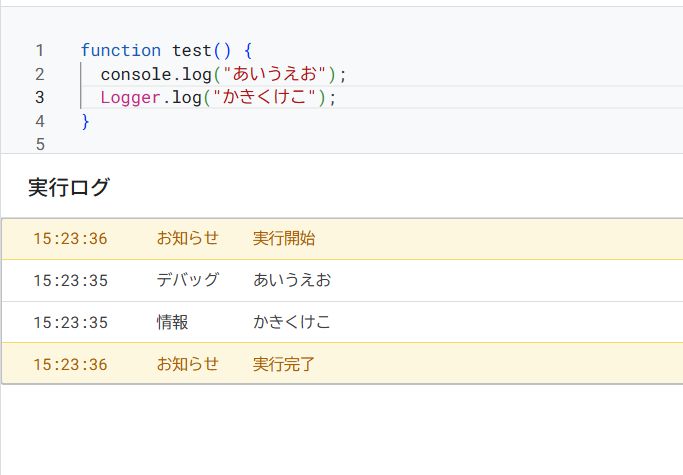
When debugging in Google Apps Script (GAS), you've probably wondered: "Should I use Logger.log or console.log?"
This article summarizes the differences and the best practice for real-world development.
Conclusion: Use console.log
Let's start with the conclusion.
For any new GAS code, use console.log. Logger.log is basically the "old way" of doing things.
I'll explain why below, but if you're in doubt, console.log is the way to go.
Differences between Logger.log and console.log
Functional Comparison
The main point is simple:
- console.log is "Standard JavaScript"
- Logger.log is "Legacy GAS mechanism"
Actual Display Differences
Example of Logger.log
Logger.log(obj);- Objects often display as [object Object].
- You need JSON.stringify to see the contents.
Example of console.log
console.log(obj);- You can see the object structure as is.
- Checking Arrays and JSON is instant.
👉 Debugging efficiency is completely different.
Which one should you use in practice?
Daily Development & Testing
console.log(data);This is sufficient.
- Easy to read
- Fast
- You can use your standard JS knowledge
When to use Logger.log (Exceptions)
Honestly, the use cases are very limited.
- When maintaining old GAS code
- When you need to match existing code style
- Simple one-line string logs
There is almost no reason to actively use it in new implementations.
Notes on Triggers and Production
This is important.
Both Logger.log and console.log are not visible immediately during trigger executions.
In both cases, you check the logs afterwards.
Therefore, in practice, you should use it like this:
console.error(e);Or
console.log({
  status: "error",
  message: e.message
});
👉 Structured logs make it easier to trace issues later.
Common Misconceptions
❌ Is Logger.log safer? → No, it's unrelated.
❌ Is console.log unstable in GAS? → No, it is officially supported.
❌ Is Logger.log recommended? → No. It's just been around longer.
Summary
- New Code → console.log
- Logger.log → For legacy support
- Debugging efficiency & future-proofing → console.log wins
When tracking errors or behavior in GAS, "how you log" can significantly change your work time.
I recommend unifying on console.log so you can debug with the same feeling across JS, Node.js, and GAS.