Sometimes WordPress shows:
Installation failed: Could not copy file.
Many people think this is caused by “low storage,” but in my ZIDOOKA! case, the real error case was different.
■ The real error case: File count limit (inode), not storage
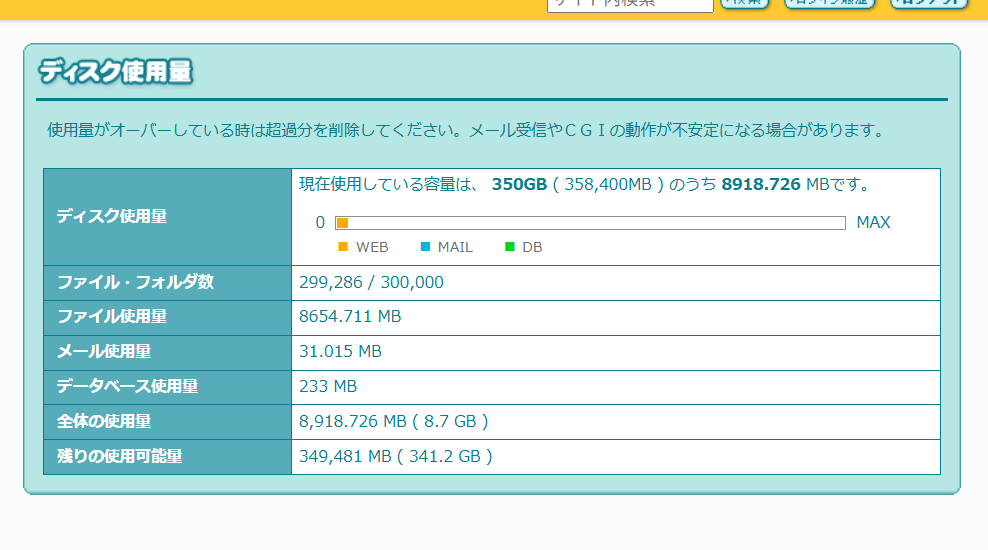
On Lolipop! hosting, my disk had plenty of space, but the file count limit was almost full:
- 299,286 / 300,000 files
I also had four WordPress installations, and unused themes, plugins, images, and caches were quietly increasing the file count.
When WordPress installs a plugin, it needs to:
- Extract the ZIP (creates many files)
- Copy them to the plugin folder
If the file count is full, WordPress cannot create new files → error.
■ How I fixed it
- Removed unused WordPress installations entirely
- Deleted unused themes/plugins
- Cleared cache folders
- Removed image optimizer backups
After freeing tens of thousands of files, plugin installation started working again.
■ Simple advice
If you use shared hosting like Lolipop!:
- Check “file count,” not just disk space
- Remove unused WordPress installs
- Keep cache/backups clean
This alone prevents most installation errors.