"Critical Error" Only in WordPress Admin? Fixing it via wp-config.php
One day, when I tried to access the WordPress admin dashboard, I was greeted with the despairing message: "There has been a critical error on this website."
However, strangely enough, the front end of the website was displaying perfectly fine. Only the admin dashboard was dead.
In this post, I'll document the steps I took to identify the cause using wp-config.php and restore access.
The Situation: Admin Dashboard is White (or Error Message)
- Symptom: Accessing
/wp-admin/results in a "Critical Error" screen. - Website: Works fine. Articles are readable.
- Clue: I might have touched
functions.phprecently… or maybe not.
Step 1: Enable Debug Mode in wp-config.php
First, we need to know what the error is. I opened wp-config.php via FTP or the server's file manager to check the debug settings.
The original configuration was:
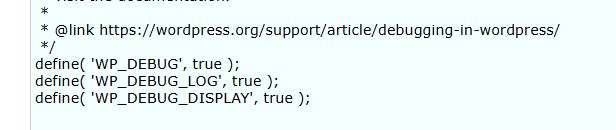
define( 'WP_DEBUG', false );This suppresses errors. So, I changed it to:
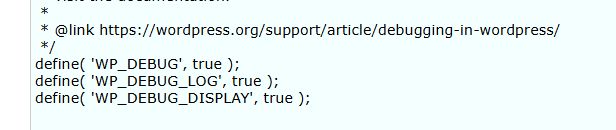
define( 'WP_DEBUG', true );
define( 'WP_DEBUG_LOG', true );
define( 'WP_DEBUG_DISPLAY', true );
Note: In my case, I found that define('WP_DEBUG', true); was also added at the very end of wp-config.php (after require_once ABSPATH . 'wp-settings.php';), resulting in a duplicate definition. This can cause settings to be ignored or lead to unexpected behavior, so I fixed it to have only one definition in the correct place (before loading wp-settings.php).
Step 2: Check the Error Message
After enabling debug mode and accessing the admin dashboard again, a specific error message appeared:
Fatal error: Uncaught Error: Call to a member function get() on false in .../themes/parent-theme/inc/options-page.php:18
Stack trace:
#0 .../themes/child-theme/functions.php(61): get_parent_theme_version_check()
#1 ...
#4 .../wp-admin/admin-header.php(313): do_action('admin_notices')
...
This is the culprit.
- Location: Child theme's
functions.phpline 61 - Function: Parent theme version check function
- Hook:
admin_notices(Admin dashboard notifications)
It seems that when the function checking the parent theme version was called at a specific timing in the admin dashboard, it failed to retrieve an object internally (returning false) and then tried to call the get() method on it, causing the crash.
Since this admin_notices hook doesn't run on the front end, the site itself remained safe.
Step 3: Fix functions.php and Restore
Once the cause is known, the fix is simple. I opened the child theme's functions.php and commented out (or deleted) the offending admin_notices process.
// Before fix: This was causing the error
/*
add_action( 'admin_notices', function  () {
    if( (get_parent_theme_version_check())>=3.0) return;
    $message = __( 'This Child Theme requires at least Version 3.0.0...', 'textdomain' );
    printf( '<div class="%1$s"><h1>%2$s</h1></div>', esc_attr( 'notice notice-error' ), esc_html( $message ) );
} );
*/
After disabling this code, I was able to log in to the admin dashboard successfully!
Summary
- If only the admin dashboard has an error, suspect admin-specific hooks (like
admin_notices) or processes that only run in the admin area. - Enabling
WP_DEBUGtotruein wp-config.php is the shortest route to seeing the error message. - Be careful about the position of code in
wp-config.php(beforewp-settings.php) and duplicate definitions.
I hope this helps anyone encountering a similar phenomenon.