Check Your Domain Settings When 403 Errors Persist
Hello, this is ZIDOOKA. Today, I want to share a troubleshooting experience I had while trying to upload images via the WordPress REST API.
The conclusion is simple: I overlooked that 'www' and 'non-www' domains are managed separately.
The Problem
I was trying to post an article to WordPress using a custom CLI tool, but image uploads were consistently failing with a 403 Forbidden error.
Usually, this is caused by the WAF (Web Application Firewall) on the hosting server (in this case, Lolipop!), so I decided to check the settings.
The Trap
I checked the server settings on the Lolipop user dashboard and tried to investigate based on the logs. However, no matter how much I reviewed the settings, changed the User-Agent, or resized the images, the 403 error persisted.
I wondered for hours why my changes weren't being reflected. The cause was incredibly simple.
The Cause: www vs non-www
I was checking the settings for www.zidooka.com.
However, the REST API endpoint I was actually hitting was zidooka.com (without www).
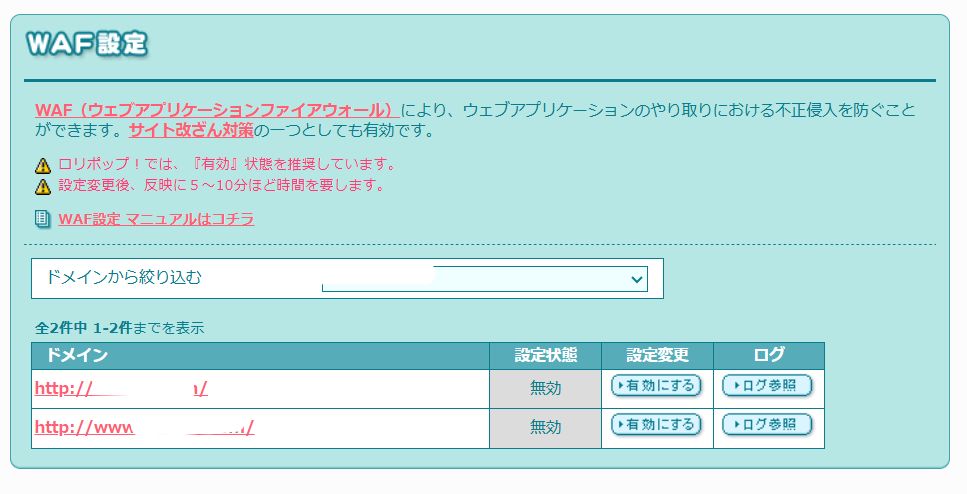
In Lolipop's specification, the "www" and "non-www" versions of a custom domain are listed as separate domains in the settings screen.
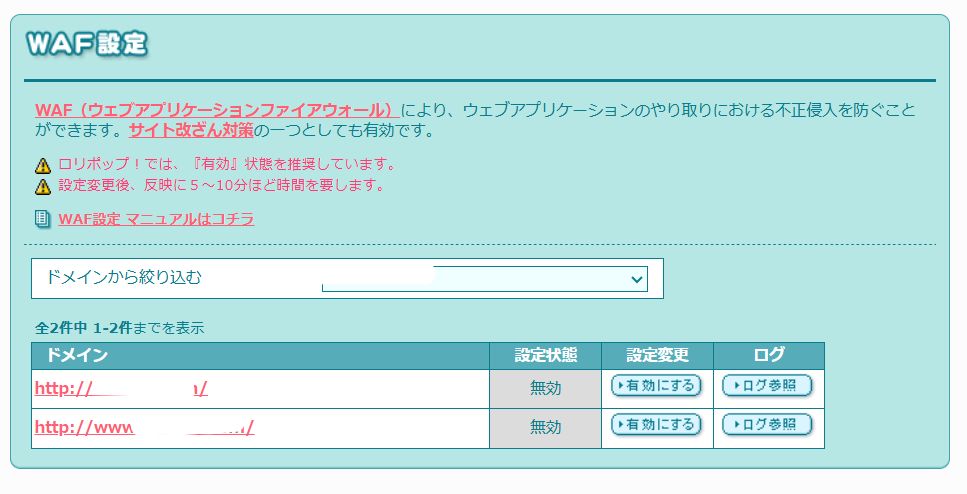
As shown in the image above, I didn't realize the settings were separated, and I was frantically adjusting the settings for the domain I wasn't even using. Naturally, changing settings on the wrong domain had no effect on the actual endpoint.
The Solution
I needed to check the settings for the correct domain (in this case, zidooka.com without www).
Since I was looking at the wrong domain, my investigation was going nowhere.
Once I looked at the correct domain's configuration, I was finally able to identify the issue and resolve it. If you get 403 errors with the WordPress REST API, check your domain settings and logs carefully
Summary
- Suspect the WAF if you get 403 errors with the WordPress REST API.
- On servers like Lolipop, "www" and "non-www" settings may be independent.
- Always verify that the domain you are configuring matches the endpoint you are accessing.
It was a simple mistake, but assumptions can make it hard to spot. I hope this helps anyone else struggling with a similar issue.