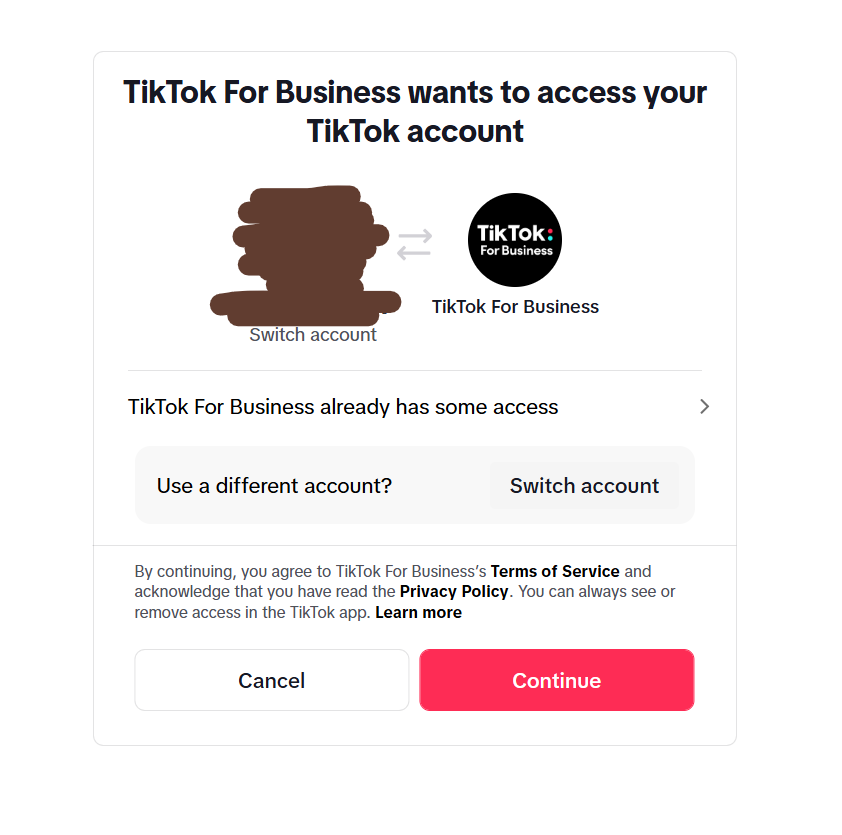
When logging into TikTok For Business from your TikTok app, you may see a screen saying:
“TikTok For Business wants to access your TikTok account.”
If you’re not familiar with TikTok’s permission flow, this screen can feel alarming.
Here’s a clear explanation based on the actual screen that appeared when I linked my TikTok account from within the TikTok app.
1. Why this screen appears: OAuth (permission confirmation)
TikTok For Business requires certain permissions to:
- manage ads
- access your profile information
- link your TikTok account to Ads Manager
To ensure transparency, TikTok shows an OAuth confirmation screen where you must explicitly approve the connection.
This is normal and official behavior, not a security threat.
2. What each part of the screen means
● “TikTok For Business wants to access your TikTok account”
→ The system is requesting permission to connect the two accounts.
● Account icon + “Switch account”
→ Lets you choose which TikTok account to link.
● “TikTok For Business already has some access”
→ Appears if you previously authorized partial access.
● “Use a different account?”
→ Helpful when managing ads for multiple profiles.
● “Continue” button
→ Proceed to authorize the connection.
3. Is it safe to press Continue?
Yes — if you reached this page through the official TikTok or TikTok For Business login flow.
Before pressing Continue, double-check:
- The URL is an official TikTok domain
- No suspicious redirects occurred
- The selected account is the correct one
Mis-linking accounts is a common issue among advertisers, so be careful especially if you manage multiple accounts.
4. If the connection fails or loops back
Try the following:
- Update the TikTok app
- Remove and re-authorize the account in TikTok For Business
- Try a different browser (Chrome / Safari)
- Avoid Wi-Fi switching moments (OAuth can fail during brief disconnects)
5. Summary
This screen is a legitimate permission request shown during account linking.
Understanding what each element means helps prevent incorrect account connections and allows you to safely proceed with your TikTok Business setup.
References
- TikTok Business Help Center
https://ads.tiktok.com/help/article?aid=10004182 - TikTok OAuth Overview
https://developers.tiktok.com/doc/oauth-user-info-basic/
