When you copy a link from ChatGPT, Perplexity, or Gemini, you may notice something extra added to the URL:
?utm_source=chatgpt.com
At first glance, this looks harmless.
But in practice, these tracking parameters often cause small but persistent problems—especially when you share links in Slack, Notion, documentation, or blog posts.
That is why Remove ChatGPT UTM exists.
What problem does this tool solve?
Modern AI tools frequently append tracking parameters such as:
- utm_source=chatgpt.com
- utm_source=perplexity.ai
- utm_source=gemini.google.com
These parameters are useful for analytics, but they also create friction:
- URLs look messy and unprofessional
- The same page appears as multiple URLs in analytics tools
- Shared links become harder to read and trust
- Copy-pasted links pollute internal documents and chats
If you care about clean URLs, this quickly becomes annoying.
What is Remove ChatGPT UTM?
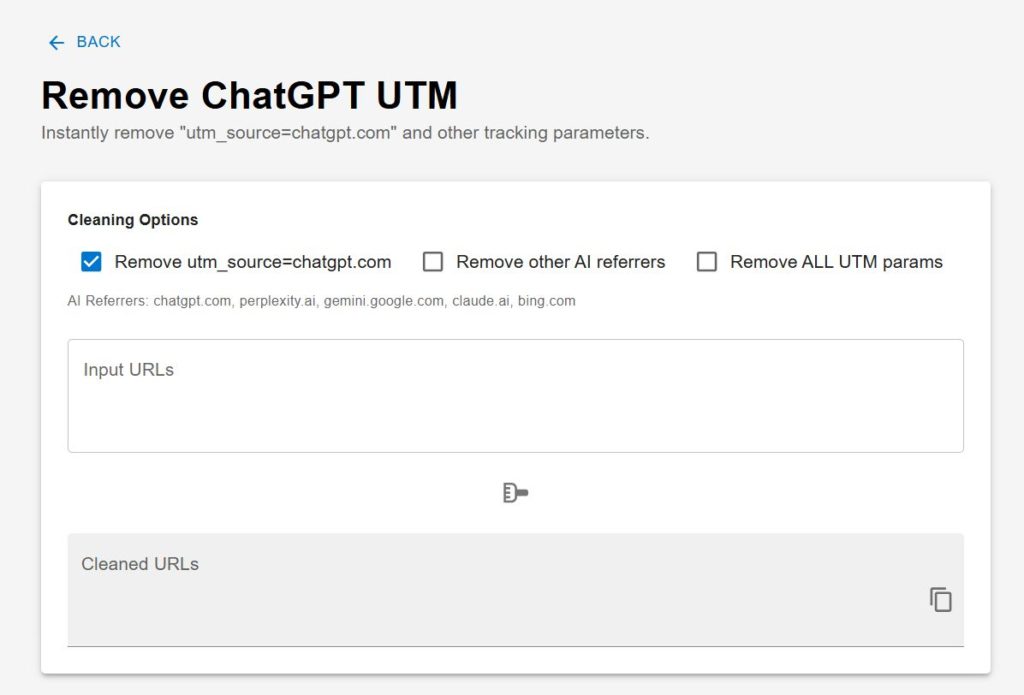
Remove ChatGPT UTM is a small, browser-based utility that removes AI-related tracking parameters from URLs.
It works instantly, directly in your browser, with no server processing.
You simply paste your URLs, and the tool outputs clean versions—ready to share.
Cleaning options
The tool lets you choose how aggressively to clean URLs:
- Remove utm_source=chatgpt.com only
- Remove other AI referrers
- Remove all UTM parameters
Supported AI referrers include:
- chatgpt.com
- perplexity.ai
- gemini.google.com
- claude.ai
- bing.com
This makes it useful not only for ChatGPT users, but for anyone working with AI-assisted research or writing.
Typical use cases
This tool is especially helpful if you:
- Share links frequently in Slack or Notion
- Maintain technical documentation or internal wikis
- Write blog posts and want canonical-looking URLs
- Care about analytics consistency
- Prefer clean, readable links in general
It is designed for developers, writers, researchers, and teams who value clarity over tracking noise.
How it works
- Paste one or multiple URLs (one per line)
- Select your cleaning options
- Copy the cleaned URLs
All processing happens locally in your browser. No data is sent to a server, and nothing is stored.
Why this tool exists
AI tools are becoming part of everyday workflows. As a result, AI-generated links are everywhere.
Instead of fighting that trend, this tool accepts reality and fixes one small, concrete problem that comes with it.
Clean URLs may seem like a minor detail—but over time, details like this shape how readable, reliable, and maintainable your work becomes.
Try it now
If you are tired of seeing utm_source=chatgpt.com attached to otherwise clean links, this tool does exactly one thing—and does it well.
