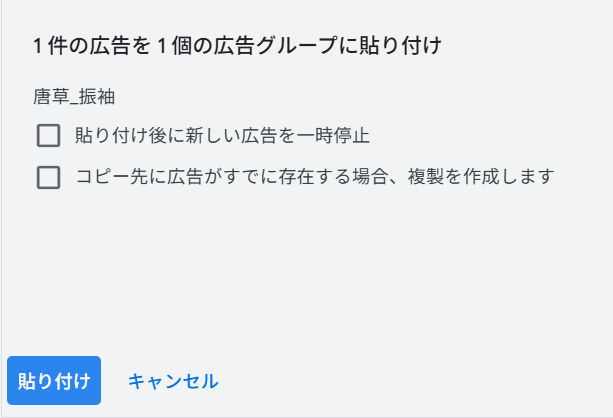
When copying an ad into another ad group in Google Ads, you may encounter the message: “This ad already exists and can’t be pasted.” This appears when the destination ad group already contains an ad with the exact same assets and structure. Google treats such duplicates as the same ad, so the paste action is blocked to prevent redundancy.

The quickest way to resolve this is to check the option “Create a duplicate if an ad already exists in the destination.” Enabling this allows Google Ads to paste the ad even if its content matches an existing one. Alternatively, modifying a single element—such as a headline, description, or path—forces Google Ads to recognize it as a different ad. If the conflict is caused by an unwanted duplicate, deleting the existing ad before pasting is another simple fix.
Duplicate-related issues tend to occur when managing campaigns that share similar creatives across multiple ad groups. Still, as long as you apply one of the above approaches, the message is easy to resolve and won’t interfere with your workflow.
Reference URLs (English)
- Google Ads Help — Create & Edit Ads
https://support.google.com/google-ads/answer/2375464
