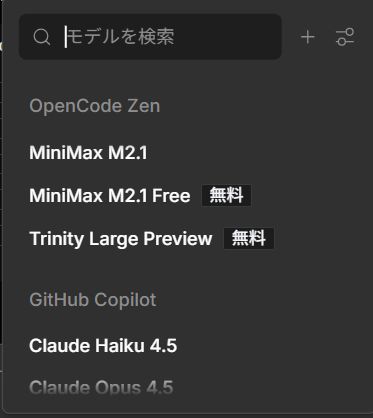
"Trinity Large Preview" has appeared in OpenCode Zen's free tier as a new AI model in preview stage. This article provides a beginner-friendly explanation of Trinity Large Preview's features, usage, and practical applications.
What is Trinity Large Preview?
Trinity Large Preview is a large language model offered for free on the OpenCode Zen platform.
Key Point: Being a preview version, you can try the latest technology completely free of charge.
Basic Information
- Provider: OpenCode Zen Platform
- Pricing: Free (Preview Version)
- Access: OpenCode Zen model selection screen
- Use Cases: Programming, writing, information retrieval, and more
Main Features of Trinity Large Preview
1. Free Access
Conclusion: As a preview version, you can experience high-level AI assistant functionality completely free.
While high-performance AI models typically require paid plans, Trinity Large Preview is available to free-tier users without limitations during the preview period.
2. High Versatility of Large-Scale Models
As the name "Large" suggests, it's a model with a large number of parameters. This enables it to handle a wide range of tasks:
- Code generation and debugging
- Writing and proofreading
- Question answering
- Data analysis
- Translation
3. Preview Version Benefits
Preview versions offer the opportunity to try the latest technology before official release. You can also contribute to product improvement through feedback.
What is OpenCode Zen?
OpenCode Zen is a platform that integrates multiple AI models.
Main Models Available on OpenCode Zen
Models visible in the screenshot:
- MiniMax M2.1: Coding-specialized model
- MiniMax M2.1 Free: Free version of MiniMax M2.1
- Trinity Large Preview: General-purpose large model (Free)
- GitHub Copilot: Microsoft's coding AI
- Claude Haiku 4.5: Anthropic's high-speed model
- Claude Opus 4.5: Anthropic's highest performance model
Key Point: OpenCode Zen is a convenient platform that allows you to select the optimal AI model for your specific needs.
How to Use Trinity Large Preview
Step 1: Access OpenCode Zen
- Log in to the OpenCode Zen platform
- Open the model selection screen
Step 2: Select Trinity Large Preview
- Find "Trinity Large Preview" in the model list
- Confirm it has a "Free" label
- Click to select
Step 3: Start Conversation
After selection, you can immediately interact with the AI in a chat format.
Action: If using for the first time, start with simple questions to understand the model's response style.
Use Cases for Trinity Large Preview
Recommended Uses for Beginners
1. Programming Learning
Example: "Please teach me how to create a simple calculator program in Python"Trinity Large Preview provides code examples while explaining carefully.
2. Writing Support
- Blog post drafts
- Email composition
- Report structure planning
3. Information Organization
Suitable for summarizing large amounts of information or extracting key points.
Choosing Between Models
Conclusion: For free, wide-ranging use, combining Trinity Large Preview and MiniMax M2.1 Free is recommended.
Considerations When Using Preview Versions
1. Stability
Caution: As a preview version, specifications may change or service may be discontinued without notice.
For critical production work, use officially released models.
2. Potential Feature Limitations
Preview versions may have some advanced features restricted.
3. Data Handling
Even with preview versions, avoid inputting confidential or personal information.
Comparison with Other Free Models
vs Free ChatGPT
- Trinity Large Preview: OpenCode Zen integrated, latest preview technology
- Free ChatGPT: GPT-3.5 based, high stability
vs MiniMax M2.1 Free
- Trinity Large Preview: For general tasks
- MiniMax M2.1 Free: Coding-specialized
Summary
Trinity Large Preview is a large language model available for free on the OpenCode Zen platform.
Conclusion: It's a valuable opportunity to try the latest technology for free, unique to preview versions.
Recommended For
- First-time AI tool users
- Those wanting to try high-performance AI for free
- Users needing general tasks beyond coding
- Those wanting to compare multiple AI models
Getting Started
- Access OpenCode Zen platform
- Select "Trinity Large Preview" in the model selection screen
- Start with simple questions
Since preview versions may be time-limited, we recommend trying it soon if you're interested.
References
- OpenCode Zen Platform https://opencode.zen/
- MiniMax AI Official Website https://www.minimax.io/
- MiniMax M2.1 Release Announcement https://www.minimax.io/news/minimax-m21
