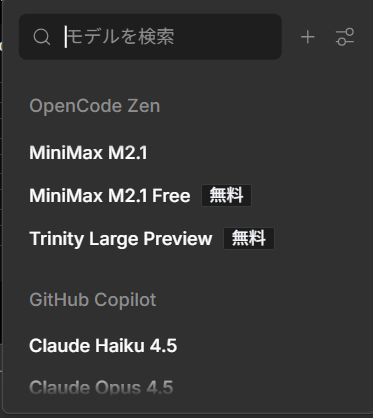
"MiniMax M2.1" and "MiniMax M2.1 Free" have appeared on OpenCode Zen as high-performance AI models specialized for coding. This article provides a beginner-friendly explanation of MiniMax M2.1's features, differences between versions, and usage guidelines.
What is MiniMax M2.1?
MiniMax M2.1 is a coding-specialized large language model developed by MiniMax, a Chinese AI company.
Conclusion: It's a practical coding AI with performance equivalent to Claude Sonnet 4.5, and in some cases surpassing Claude Opus 4.5.
Basic Information
- Developer: MiniMax (Chinese AI company)
- Release Date: December 2023
- Specialization: Coding, software development
- Platforms: OpenCode Zen, MiniMax Agent, various coding tools
- License: Open source (published on HuggingFace)
Main Features of MiniMax M2.1
1. Strong Multi-Language Programming Support
Key Point: Demonstrates high performance not only in Python but also in other languages.
Supported languages:
- Python
- JavaScript / TypeScript
- Java
- Rust
- C++
- Golang
- Kotlin (Android development)
- Objective-C / Swift (iOS development)
While many coding AIs have been trained primarily on Python, MiniMax M2.1 achieves practical-level accuracy across a wide range of languages.
2. High Performance in Real Coding Tasks
Records excellent results in the industry-standard benchmark "SWE-bench Verified."
3. Specialized Features for WebDev & AppDev
Conclusion: Supports both design and coding for web and mobile app development.
Can actually handle development such as:
Web Development Examples
- Development using React, Vue, etc.
- 3D graphics (Three.js)
- SVG generation
- UI/UX design implementation
Mobile App Development Examples
- Android (Kotlin)
- iOS (Swift)
- Cross-platform
4. Agent Functionality (Tool Usage)
MiniMax M2.1 can not only generate code but also operate actual tools to complete tasks.
Demo Examples:
- Manipulate Excel to analyze market research data
- Search and update Issues in GitLab
- Workflows linking multiple tools
Differences Between MiniMax M2.1 and MiniMax M2.1 Free
OpenCode Zen offers both the paid "MiniMax M2.1" and free "MiniMax M2.1 Free" versions.
Comparison Table
Action: If using for the first time, start with MiniMax M2.1 Free to try the features, then switch to the paid version if needed.
How to Use MiniMax M2.1
Usage on OpenCode Zen
Step 1: Select Model
- Open OpenCode Zen's model selection screen
- Select "MiniMax M2.1" or "MiniMax M2.1 Free"
- Communicate the type of coding task
Step 2: Give Specific Instructions
Example: "Create a ToDo list app in React where users can add and delete tasks"Key Point: Specifying frameworks and libraries specifically will generate more accurate code.
Step 3: Review and Improve Code
Review the generated code and request improvements as needed.
Example: "Add functionality to this code to manage task completion状態"Integration with Other Development Tools
MiniMax M2.1 can also be used with popular coding tools such as:
- Cline (formerly Claude Dev): VSCode extension
- RooCode: AI pair programming tool
- BlackBox AI: Coding assistant
- Factory AI (Droid): Automated development tool
Practical Use Cases for MiniMax M2.1
Recommended Uses for Beginners
1. Sample Code Generation for Learning
Prompt example:
"Please teach me basic Python code to read and display data from a JSON file. Please include detailed comments"
Generates code and explanations that are easy for beginners to understand.
2. Error Debugging
Prompt example:
"I'm getting an error with this Python code. Please tell me the cause and how to fix it.

[Paste code with error]
"
Identifies the cause of errors and suggests fixes.
3. Code Review
Prompt example:
"Please point out improvements to this code. Focus on performance, readability, and security"
Intermediate User Applications
1. Full-Stack Development
Can develop applications linking front-end (React) and back-end (Node.js).
2. 3D Visualization
Supports implementation of 3D graphics using Three.js.
3. Mobile App Development
MiniMax M2.1 handles native Android and iOS app development.
Considerations When Using MiniMax M2.1
1. Verify Generated Code
Caution: Always perform operation checks and security checks on AI-generated code.
Pay particular attention to:
- Security vulnerabilities
- Edge case handling
- Performance optimization
2. License Verification
When using open-source libraries, verify licenses.
3. Handling Confidential Information
Action: Avoid passing company confidential information or API keys to the AI.
Comparison with Other Coding AIs
MiniMax M2.1 vs GitHub Copilot
MiniMax M2.1 vs Claude Sonnet 4.5
Conclusion: MiniMax M2.1 is recommended for coding-specific use, while Claude Sonnet 4.5 is better for general-purpose use.
Future Outlook for MiniMax M2.1
MiniMax aims to build an AI-native development environment.
Expected future features:
- Expansion of additional language support
- Enhanced agent functionality
- More advanced code optimization
Summary
MiniMax M2.1 is a practical AI model specialized for coding.
Conclusion: With multi-language support, fast responses, and free version availability, it's a powerful tool usable by everyone from beginners to professionals.
Recommended For
- Those wanting AI support in languages beyond Python
- Web/mobile app developers
- Beginners learning coding
- Professional developers needing fast responses
Getting Started
- Try for free: Select MiniMax M2.1 Free on OpenCode Zen
- Start with simple tasks: Try small projects like a ToDo app
- Upgrade as needed: Consider paid version for serious development
Since MiniMax M2.1 is published as open source, local environment usage is also possible. If interested, check the HuggingFace repository.
References
- MiniMax M2.1 Official Announcement https://www.minimax.io/news/minimax-m21
- MiniMax AI Official Website https://www.minimax.io/
- MiniMax M2.1 on HuggingFace https://huggingface.co/MiniMaxAI/MiniMax-M2.1
- MiniMax Open Platform Documentation https://platform.minimax.io/docs/guides/models-intro
